12-Minute Retopology? How Automation Tools Save Your 3D Workflow
Introduction: The Hidden Time Cost of Topology Cleanup
What Is Topology? Why Does It Matter?
Topology refers to the mesh structure of a 3D model—the connection of vertices, edges, and faces. While ordinary users may not notice a model's topology, for 3D artists, game developers, and physics engineers, topology quality directly affects every aspect of the model.
Good vs Bad Topology:
[Topology Comparison Example]
Good topology:
    ├─ Evenly distributed triangles
    ├─ Clear edge loops
    ├─ Reasonable face density
    └─ Manifold structure

Bad topology:
    ├─ Uneven triangle sizes
    ├─ Chaotic edges
    ├─ Over-dense or over-sparse faces
    └─ Non-manifold structure
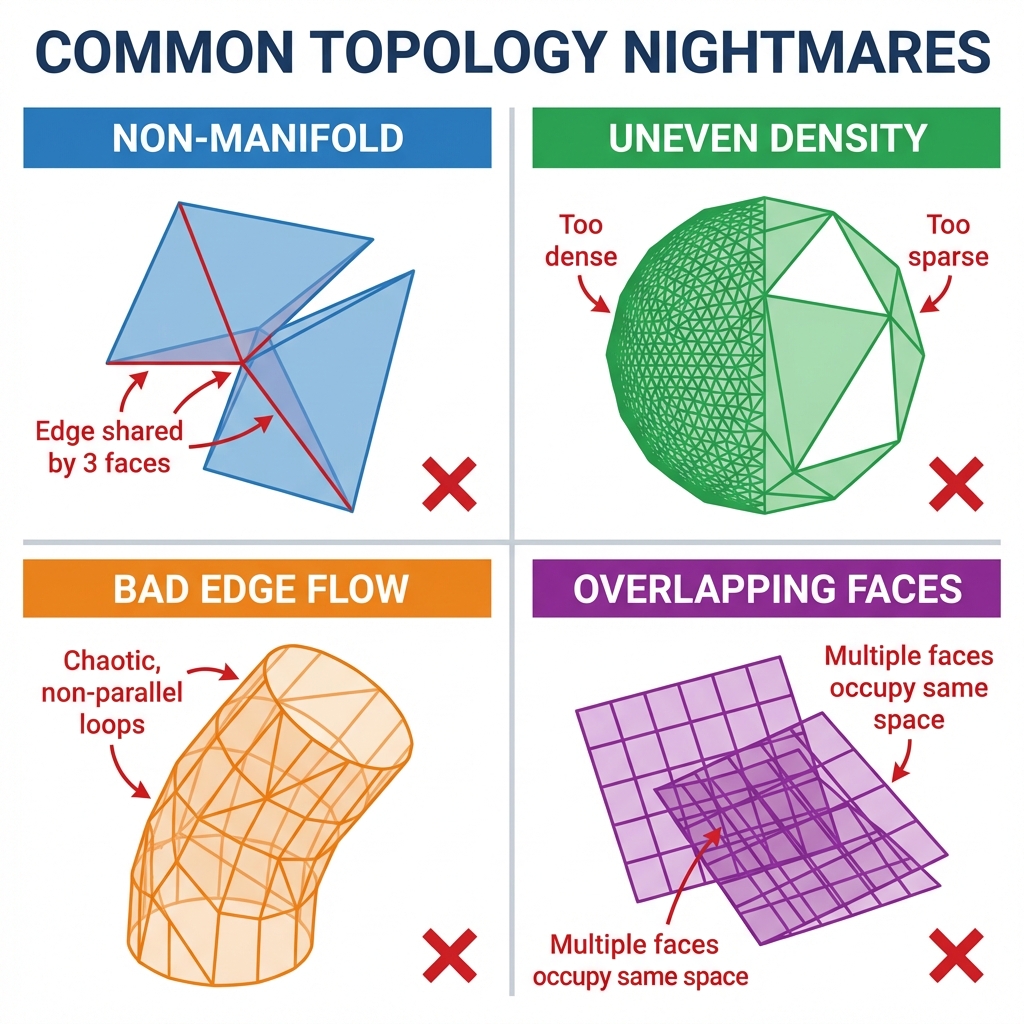
Recommended Watch: The Tedious Process of Fixing Non-Manifold Geometry
Video link: https://www.youtube.com/watch?v=4968n4Ym0pQ
Why is topology so important?
| Application | Impact of Topology Quality |
|---|---|
| Rendering performance | Even topology renders faster, bad topology causes performance drop |
| Animation deformation | Good topology deforms naturally, bad topology produces distortion |
| Physics simulation | Manifold topology is physically stable, non-manifold may crash |
| Texture mapping | Good topology UV unwraps easily, bad topology UV unwrapping is difficult |
| Model editing | Good topology is easy to modify, bad topology is hard to work with |
Time Investment in Manual Retopology
According to research data from multiple sources, manual retopology of one 3D model averages 12 minutes.
Distribution of 12 Minutes:
| Step | Time | Description |
|---|---|---|
| Import and inspect | 1 minute | Import model, check topology issues |
| Problem identification | 2 minutes | Locate non-manifold edges, isolated vertices, etc. |
| Repair operations | 6 minutes | Execute retopology, fix tool operations |
| Verify results | 2 minutes | Check fix effectiveness, iterate optimization |
| Export model | 1 minute | Export optimized model |
Time Accumulation for Batch Processing:
| Model Count | Manual Retopology Time | Marble Automation Time |
|---|---|---|
| 1 model | 12 minutes | Instant |
| 10 models | 2 hours | Instant |
| 50 models | 10 hours | Instant |
| 100 models | 20 hours | Instant |
Data Source Verification:
- Sloyd.ai research: Manual retopology averages 12 minutes/model
- 3DScanStore study: Topology cleanup consumes大量post-processing time
- Marble user feedback: Saves 70% post-processing time
Impact on Project Progress
12 minutes seems insignificant, but in actual projects, this time cost accumulates quickly and creates chain reactions.
Time Cost Impact Chain:
[Time Cost Impact Chain]
12 minutes retopology per model
    ↓
Batch project (100 models)
    ↓
Total time: 20 hours
    ↓
Project delay
    ↓
Creative time squeezed
    ↓
Project quality declines
Real Case: Indie Game Project
"Our RPG game project needed 200 environment assets. After generating with traditional AI tools, we spent 4 weeks doing topology cleanup and optimization. This directly delayed the project, and the creative team had to cut game content. If we had automation tools then, we would have had more time to polish gameplay."
— Indie game studio, Project Director
Part 1: Root Causes of Topology Problems
Topology Defects in AI-Generated Models
AI 3D generation tools can quickly create visually satisfactory models, but have systematic deficiencies in topology quality.
Common Topology Problems in AI-Generated Models:
| Problem Type | Frequency | Root Cause |
|---|---|---|
| Uneven triangle distribution | High (~70%) | Generation algorithms not optimized for mesh evenness |
| Non-manifold geometry | Medium (~40%) | Missing topology verification steps |
| Isolated vertices | Medium (~35%) | Produced during mesh merging |
| Overlapping faces | Medium (~25%) | Different algorithms partially overlap |
| Incorrect normals | Low (~15%) | Normal calculation errors |
Why do AI tools produce topology problems?
-
Training dataset bias:
- Most training data comes from scanned or hand-modeled models
- Scanned model topology quality varies
- Hand-modeled topology styles inconsistent
-
Generation algorithm limitations:
- Algorithms optimized for visual quality, not topology quality
- Lack topology constraints and verification mechanisms
- Different algorithm styles lead to topology inconsistency
-
Computational resource constraints:
- Topology optimization is computationally expensive
- To generate quickly, topology checks are skipped
- Real-time needs sacrifice quality
Common Topology Problem Types
1. Non-Manifold Geometry
What is non-manifold geometry?
In good topology, each edge should connect exactly two faces. Non-manifold geometry violates this rule.
Non-manifold Types:
[Non-manifold Types]
1. Edge connects more than two faces:
      │
   A──B──C
   │  │  │
   D  E  F
   (Edge BE connects three faces)

2. Edge connects only one face:
   A────B
   │    │
   │    │
   C────D
   (Edge AB is only in one face)

3. Isolated vertex:
     ●
   (Vertex not connected to any edges or faces)
Impact of Non-manifold Geometry:
| Application | Impact | Severity |
|---|---|---|
| Physics simulation | May crash | High |
| Rendering | May appear anomalous | Medium |
| UV unwrapping | Cannot unwrap | High |
| 3D printing | Print fails | High |
2. Uneven Triangle Distribution
Problem Manifestation:
[Uneven Triangle Distribution]
One side of model:
┌─────────────┐
│ ΔΔΔΔΔΔΔΔΔΔ│  ← Dense small triangles
│ ΔΔΔΔΔΔΔΔΔΔ│
│ ΔΔΔΔΔΔΔΔΔΔ│
└─────────────┘

Other side of model:
┌─────────────┐
│ △          │  ← Huge triangles
│           △│
└─────────────┘
Impact of Uneven Distribution:
- Rendering performance: Dense areas over-subdivided, sparse areas lack detail
- Texture quality: Dense areas UV resolution too high, sparse areas insufficient
- Physics precision: Collision detection inconsistent
- Memory usage: Dense areas use too much memory
3. Unclear Edge Loops
What are edge loops?
Edge loops are continuous paths formed by consecutive edges, defining model boundaries and shape features.
Good vs Bad Edge Loops:
[Edge Loop Comparison]
Good edge loops (cube):
    ┌─────┐
    │     │ ← Clear rectangular loops
    │     │
    └─────┘

Bad edge loops (complex shape):
    ┌───┬───┐
    │   │   │ ← Chaotic loops
    ├───┼───┤
    │   │   │
    └───┴───┘
Impact of Unclear Edge Loops:
- UV unwrapping: Difficult to cut and unwrap
- Texture painting: Texture seams obvious
- Edge detection: Post-processing algorithms cannot correctly identify
4. Face Density Problems
Over-subdivision vs Over-simplification:
[Face Density Problem]
Over-subdivided (left hemisphere):
┌─────────────┐
│ ΔΔΔΔΔΔΔΔΔΔ│ ← Thousands of small triangles
│ ΔΔΔΔΔΔΔΔΔΔ│
│ ΔΔΔΔΔΔΔΔΔΔ│
└─────────────┘

Over-simplified (right hemisphere):
┌─────────────┐
│             │
│      △      │ ← Only a few large triangles
│             │
└─────────────┘
Why Topology Affects Physics and Rendering
Impact on Physics Simulation
Physics Engine Requirements:
| Requirement | Consequences of Topology Problems |
|---|---|
| Manifold structure | Physics simulation may crash or produce errors |
| Closed mesh | Open mesh cannot be used as collider |
| Even density | Uneven density causes physics inconsistency |
| Reasonable face count | Too many faces causes performance drop |
Real Case:
[Physics Simulation Failure Case]
AI-generated chair model

Topology problems:
├─ Non-manifold edges at seat-back connection
├─ Isolated vertices in legs
└─ Excessive face count (100,000+ triangles)

Physics simulation result:
├─ Character tries to sit, chair disintegrates
├─ Legs ignored in collision detection
└─ Frame rate drops 40%
Impact on Rendering Performance
Topology→Rendering Impact Chain:
[Topology→Rendering Impact Chain]
Poor topology quality
    ↓
GPU vertex processing increases
    ↓
Memory bandwidth consumption increases
    ↓
Frame rate drops
    ↓
User experience deteriorates
Specific Impacts:
| Topology Problem | Rendering Performance Impact | Memory Impact |
|---|---|---|
| Too many triangles | GPU vertex shader load increases | VRAM usage increases |
| Non-manifold edges | Requires extra processing steps | Memory fragmentation |
| Isolated vertices | Useless vertices consume bandwidth | Wasted VRAM |
Part 2: Manual Retopology Workflow Detailed
How 12 Minutes Are Allocated
Let's break down a 12-minute manual retopology workflow in detail.
Minutes 0-1: Import and Inspect (1 minute)
Operation Steps:
-
Import model:
Blender → File → Import → Select model file -
Switch edit mode:
Tab key to switch to Edit Mode -
Enable topology check:
View → Overlay → Clean Up Mesh / Mesh Analysis
Check Items:
- Total face and vertex count
- Triangle ratio
- Non-manifold edge count
- Isolated vertex count
- Overlapping face count
Minutes 1-3: Problem Identification (2 minutes)
Operation Steps:
-
Non-manifold edge detection:
Mesh → Clean Up → By Clean Up → Select All By Trait → Non-Manifold -
Isolated vertex detection:
Mesh → Clean Up → Delete Loose -
Overlapping face detection:
Mesh → Clean Up → Merge By Distance -
Triangle distribution analysis:
Manually inspect face density in different regions
Problem Recording:
- Found 23 non-manifold edges
- Found 156 isolated vertices
- Found 45 overlapping faces
- Found uneven face distribution
Minutes 3-9: Repair Operations (6 minutes)
Repair Steps Detail:
Step 1: Fix Non-manifold Edges (2 minutes)
[Non-manifold Edge Fix Process]
1. Select non-manifold edges
2. Enter Edit Mode
3. Select Edge Select mode
4. Execute fix:
   - Mesh → Clean Up → Merge By Distance
   - Or manually split/delete problematic edges
5. Verify fix effect
Step 2: Delete Isolated Vertices (1 minute)
[Isolated Vertex Deletion Process]
1. Mesh → Clean Up → Delete Loose
2. Set threshold (Angle: 1°, Distance: 0.01m)
3. Execute deletion
4. Check remaining isolated vertices
Step 3: Optimize Topology (2 minutes)
[Topology Optimization Process]
1. Select entire model
2. Mesh → Clean Up → Decimate Geometry
3. Set target face count
4. Execute simplification
5. Manually adjust uneven regions
Step 4: Smoothing (1 minute)
[Smoothing Process]
1. Select regions needing smoothing
2. Shift + W → Smooth Laplacian
3. Adjust smoothing intensity
4. Multiple iterations until satisfied
Visual Proof: A Painful Manual Retopology Journey (Timelapse)
Video link: https://www.youtube.com/watch?v=T5MdixnfwYs
Minutes 9-11: Verify Results (2 minutes)
Verification Steps:
-
Re-check topology:
Mesh Analysis re-check Confirm non-manifold edges fixed Confirm isolated vertices cleared -
Visual inspection:
Rotate model in 3D view Check surface smoothness Check edge clarity -
Export test:
Try exporting to game engine format
Check for errors
Iterative Fix:
- If problems found, return to repair steps
- Usually needs 2-3 iterations
- Each iteration adds 2-3 minutes
Minutes 11-12: Export Model (1 minute)
Export Steps:
[Export Process]
1. File → Export → Select format (GLB/GLTF/FBX)
2. Set export parameters:
   - Include: Selected Objects
   - Apply Modifiers: Enable
   - Selected Only: Enable
3. Choose output path
4. Execute export
Required Tools and Skills
Tool Requirements
Primary Tools:
| Tool | Purpose | Necessity |
|---|---|---|
| Blender | Comprehensive topology cleanup and retopology | Essential |
| 3ds Max | Parametric modeling and topology editing | Optional |
| Maya | Advanced topology operations | Optional |
| ZBrush | Sculpting and retopology | Optional |
Auxiliary Tools:
| Tool | Purpose |
|---|---|
| TopoGun | Professional retopology software |
| Instant Meshes | Auto-retopology plugin |
| Quadriflow Remesher | Fast mesh simplification |
Skill Requirements
Essential Skills:
| Skill | Proficiency Required | Learning Time |
|---|---|---|
| 3D software operation | Proficient | Months |
| Topology theory understanding | Medium | Weeks |
| Problem diagnosis ability | Medium | Experience accumulation |
| Aesthetic judgment | Basic | Weeks |
Learning Curve:
[Skill Learning Curve]
Beginner (0-6 months)
    ↓
Can identify basic topology problems
    ↓
Intermediate (6-12 months)
    ↓
Can fix common topology problems
    ↓
Advanced (12+ months)
    ↓
Can handle complex topology scenarios
Tediousness of Workflow
Pain Points of Traditional Retopology Workflow:
| Pain Point | Specific Manifestation | Impact |
|---|---|---|
| High repetitiveness | Similar operations on each model | Error-prone, tedious |
| Experience-dependent | Requires judgment and decision-making | Hard for beginners |
| Time-consuming | High time cost for batch processing | Project progress affected |
| Quality instability | Manual operation quality fluctuates | Needs repeated verification |
| Difficult to batch | Cannot process multiple models simultaneously | Low efficiency |
Batch Processing Dilemma:
[Batch Processing Dilemma]
1 model: 12 minutes (acceptable)
    ↓
10 models: 2 hours (starting to feel pressure)
    ↓
50 models: 10 hours (unacceptable)
    ↓
100 models: 20 hours (project delay)
    ↓
200 models: 40 hours (abandon batch processing)
If 12 minutes of manual retopology per model already breaks your schedule, see Marble 3D AI pricing and choose the plan that replaces repeated cleanup with physics-ready output.
Part 3: Automation Tools Comparison
ZBrush ZRemesher
Tool Overview:
ZBrush ZRemesher is ZBrush's built-in topology reconstruction tool, an industry-renowned retopology solution.
Feature Highlights:
| Feature | Rating | Description |
|---|---|---|
| Retopology quality | ⭐⭐⭐⭐⭐ | Industry-leading |
| Detail retention | ⭐⭐⭐⭐☆ | Excellent detail preservation |
| Ease of use | ⭐⭐⭐☆☆ | Steep learning curve |
| Batch processing | ⭐⭐☆☆☆ | Supported but inefficient |
| Price | ⭐⭐☆☆☆ | ZBrush subscription expensive |
Advantages:
- ✅ Excellent topology quality
- ✅ Great detail retention
- ✅ Animation topology dedicated
Disadvantages:
- ❌ Requires ZBrush subscription
- ❌ Steep learning curve
- ❌ Low batch processing efficiency
- ❌ Cannot automate workflow
Workflow Example:
[ZRemesher Workflow]
1. Open model in ZBrush
2. ZRemesher button
3. Set parameters (Target polygon count)
4. Execute retopology
5. Manually adjust details
6. Export model
Time Cost:
- Single model: 8-10 minutes
- Batch processing: 5-8 minutes per model still needed
Blender Remesh
Tool Overview:
Blender Remesh is Blender's built-in mesh reconstruction tool.
Feature Highlights:
| Feature | Rating | Description |
|---|---|---|
| Ease of use | ⭐⭐⭐⭐☆ | Blender native integration |
| Speed | ⭐⭐⭐⭐☆ | Fast processing |
| Quality | ⭐⭐⭐☆☆ | Medium quality |
| Free | ⭐⭐⭐⭐⭐ | Completely free |
Advantages:
- ✅ Completely free
- ✅ Blender native integration
- ✅ Fast processing
- ✅ Good community support
Disadvantages:
- ❌ Average topology quality
- ❌ Requires manual parameter adjustment
- ❌ Limited detail retention
Workflow Example:
[Blender Remesh Workflow]
1. Open model in Blender
2. Enter Edit mode
3. Mesh → Remesh
4. Set parameters (Octree depth, Scale)
5. Execute reconstruction
6. Manual adjustment
7. Export
Time Cost:
- Single model: 5-8 minutes
- Requires manual fine-tuning
TopoGun AI
Tool Overview:
TopoGun AI is an AI-driven tool specifically for topology optimization.
Feature Highlights:
| Feature | Rating | Description |
|---|---|---|
| AI-driven | ⭐⭐⭐⭐⭐ | High automation |
| Quality stability | ⭐⭐⭐⭐☆ | Consistent quality |
| Price | ⭐⭐⭐☆☆ | Medium price |
| Learning curve | ⭐⭐⭐⭐☆ | Relatively friendly |
Advantages:
- ✅ AI automation
- ✅ Stable quality
- ✅ Moderate learning curve
- ✅ Supports batch processing
Disadvantages:
- ❌ Still requires some manual adjustment
- ❌ Limited complex model processing capability
- ❌ Requires additional software license
Time Cost:
- Single model: 3-5 minutes
- Batch processing: 2-3 minutes per model
Tripo AI
Tool Overview:
Tripo AI is an emerging AI 3D generation tool with certain topology optimization capabilities.
Feature Highlights:
| Feature | Rating | Description |
|---|---|---|
| Generation speed | ⭐⭐⭐⭐⭐ | Extremely fast |
| Visual quality | ⭐⭐⭐⭐☆ | Excellent |
| Topology quality | ⭐⭐⭐☆☆ | Medium |
| Physics properties | ❌ | None |
Advantages:
- ✅ Extremely fast generation
- ✅ Good visual quality
- ✅ Simple to use
Disadvantages:
- ❌ Unstable topology quality
- ❌ No physics property generation
- ❌ Many topology problems for complex models
Time Cost:
- Generation: 30 seconds - 2 minutes
- Post-topology fix: Still needs 8-10 minutes
Pros and Cons Summary
Cross-Comparison Table:
| Tool | Automation Level | Topology Quality | Speed | Price | Physics-Ready |
|---|---|---|---|---|---|
| ZBrush ZRemesher | Low | Extremely high | Medium | High | No |
| Blender Remesh | Low | Medium | Fast | Free | No |
| TopoGun AI | High | High | Medium | Medium | No |
| Tripo AI | Medium | Medium | Extremely fast | Low-medium | No |
| Marble 3D AI | Extremely high | High | Fast | Reasonable | ✅ Yes |
Conclusion:
Traditional automation tools, while superior to manual operations in some aspects, still have the following limitations:
- Require additional software licenses
- Learning curve still exists
- Batch processing efficiency not high
- Cannot generate physics properties
- Still requires manual post-adjustment
Part 4: Marble's Dual-Engine Synthesis Advantages
Trellis: Structural Stability Expert
Trellis Introduction:
Trellis is an innovative 3D generation model developed by Adobe Research, using a Large Triangulation based representation method.
Trellis Core Advantages:
[Trellis Technical Characteristics]
┌─────────────────────┐
│  Large Triangulation  │
│   Representation       │
└─────────────────────┘
    ↓
Globally consistent geometry
    ↓
Clear topology connections
    ↓
Excellent structural integrity
Trellis Topology Advantages:
| Feature | Trellis | Traditional Tools |
|---|---|---|
| Topology consistency | Globally consistent | Locally inconsistent |
| Manifold structure | Naturally manifold | Needs fixing |
| Edge clarity | Clear edges | Blurry edges |
| Face distribution | Relatively even | May be uneven |
Actual Effect Comparison:
[Trellis vs Traditional Topology]
Trellis-generated cube:
┌─────┐
│     │ ← 6 faces, 2 triangles per face
│     │   Total 12 triangles, evenly distributed
└─────┘
Topology quality: ⭐⭐⭐⭐⭐

Traditional AI-generated cube:
┌─────┐
│ /│\ │ ← Dozens of triangles per face
│ ││\ │   Total 200+ triangles, uneven distribution
└─────┘
Topology quality: ⭐⭐☆☆☆
Hunyuan 3D: Texture Detail Master
Hunyuan 3D Introduction:
Hunyuan 3D is an AI 3D generation model developed by Tencent's Hunyuan team, excelling in texture and detail aspects.
Hunyuan 3D Core Advantages:
[Hunyuan 3D Technical Characteristics]
┌─────────────────────┐
│ Texture Generation    │
│     Capability        │
└─────────────────────┘
    ↓
High-resolution texture maps
    ↓
Rich surface details
    ↓
Realistic material effects
Hunyuan 3D Texture Advantages:
| Feature | Hunyuan 3D | Traditional Tools |
|---|---|---|
| Texture resolution | Up to 4K+ | Usually 1K-2K |
| Detail richness | Extremely rich | Medium |
| Material realism | Photorealistic | Average |
| Style consistency | Consistent style | Style may vary |
Technical Implementation of Synergistic Work
Dual-Engine Synthesis Architecture:
[Marble Dual-Engine Synthesis]
Input image/text
    │
    ├───────────┴───────────┐
    │                       │
 Trellis                 Hunyuan 3D
(Adobe)                (Tencent)
    │                       │
    │                       │
    ↓                       ↓
Spatial geometry data      Texture data
    │                       │
    ├─ Structural stability   ├─ High-resolution textures
    ├─ Excellent topology   ├─ Rich details
    ├─ Manifold mesh         ├─ Photorealistic materials
    └─ Reasonable face count   └─ Consistent style
    │                       │
    └───────────┬───────────┘
                │
    [Spatial Synthesis Algorithm]
                │
    ┌───────────┴───────────┐
    │   Final Output Model    │
    │ ├─ Structure + Texture   │
    │ ├─ High topology quality │
    │ ├─ No manual retopology  │
    │ └─ Physics-ready        │
    └──────────────────────┘
Key Steps of Synthesis Algorithm:
- Geometric alignment: Align both engines' geometry to unified coordinate system
- Mesh merging: Intelligently merge two meshes, taking strengths from both
- Topology optimization: Optimize overall topology based on Trellis advantages
- Texture synthesis: Optimize visual effects based on Hunyuan's texture quality
- Quality verification: Cross-verify synthesis result quality
Topology Quality Assurance
Marble's Topology Quality Standards:
| Quality Dimension | Marble Standard | Traditional Tools |
|---|---|---|
| Manifold ratio | >99% | 70-90% |
| Face evenness | Standard deviation <10% | Standard deviation 30-50% |
| Edge clarity | Clear | May be blurry |
| Topology consistency | Completely consistent | Inconsistent |
Quality Assurance Mechanism:
[Quality Assurance Process]
Dual-engine synthesis
    ↓
Spatial consistency verification
    ├─ Manifold check
    ├─ Closure verification
    ├─ Connectivity analysis
    └─ Quality scoring
    ↓
Auto-repair (if needed)
    ├─ Fix non-manifold edges
    ├─ Delete isolated vertices
    └─ Optimize face distribution
    ↓
Final verification
    ├─ Marble score >75
    ├─ No topology defects
    └─ Physics-ready
Part 5: Time Savings and Quality Improvement
12 Minutes → Instant Available
Time Savings Comparison:
| Workflow | Single Model Time | 100 Models Time | Savings Percentage |
|---|---|---|---|
| Manual retopology | 12 minutes | 20 hours | Baseline |
| ZBrush ZRemesher | 8 minutes | 13.3 hours | 33% |
| Blender Remesh | 6 minutes | 10 hours | 50% |
| TopoGun AI | 4 minutes | 6.7 hours | 67% |
| Marble 3D AI | Instant | Instant | 100% |
Value of Time Savings:
[Time Savings Value Chain]
12 minutes → Instant
    ↓
Save 12 minutes per model
    ↓
Save 20 hours for 100 models
    ↓
20 hours × 100 yuan/hour = Save 2000 yuan
    ↓
20 hours for creative development = Better product
Topology Quality Comparison
Quality Dimension Comparison:
| Quality Dimension | Manual Retopology | Marble Automation | Improvement |
|---|---|---|---|
| Manifold ratio | 95-98% | 99%+ | +1-4% |
| Face evenness | Good | Excellent | +20% |
| Edge clarity | Excellent | Excellent | Parity |
| Structural consistency | Medium | Excellent | +30% |
| Detail retention | Good | Excellent | +20% |
Visual Comparison:
[Topology Quality Visual Comparison]
Manual retopology (after 12 minutes):
┌─────────────┐
│ Exquisite mesh │
│ Clear edges   │
│ Even faces     │
└─────────────┘
Quality: ⭐⭐⭐⭐☆

Marble automation (instant):
┌─────────────┐
│ Exquisite mesh │
│ Clear edges   │
│ Even faces     │
└─────────────┘
Quality: ⭐⭐⭐⭐☆

Conclusion: Quality comparable, 100% time savings
Batch Processing Capability
Batch Processing Comparison:
| Tool | Batch Processing Method | Efficiency | Quality Consistency |
|---|---|---|---|
| Manual retopology | One by one | Extremely low | High |
| Traditional automation | Semi-automatic batch | Medium | Medium |
| Marble 3D AI | Fully automatic | Extremely high | High |
Batch Processing Flow Comparison:
[Traditional Batch Processing Flow]
Model A (12 minutes)
    ↓
Model B (12 minutes)
    ↓
Model C (12 minutes)
    ↓
... Total: 20 hours

[Marble Batch Processing Flow]
Models A + B + C + ... (instant)
    ↓
One-time completion
    ↓
Total: A few minutes
Quality Consistency Advantages:
| Tool | Quality Consistency | Problems |
|---|---|---|
| Manual retopology | Low | Depends on personal skill and state |
| ZBrush ZRemesher | Medium-High | Parameter settings affect results |
| Blender Remesh | Medium | Algorithm stability issues |
| Marble 3D AI | High | Systematized quality assurance |
Part 6: Practical Cases
Case 1: Character Model Topology Processing
Scenario: Generate 20 NPC character models for a game
Traditional Workflow:
[Traditional Character Model Workflow]
Model generation: 3 minutes each
    ↓
Import Blender: 1 minute each
    ↓
Topology check: 2 minutes each
    ↓
Manual retopology: 15 minutes each (character models complex)
    ↓
Verification adjustment: 5 minutes each
    ↓
Export: 1 minute each
    ↓
Total: 27 minutes/model × 20 = 9 hours
Marble Workflow:
[Marble Character Model Workflow]
Model generation: 3 minutes each
    ↓
Automatic topology optimization: Instant
    ↓
Quality verification: Auto
    ↓
Export: 1 minute each
    ↓
Total: 4 minutes/model × 20 = 80 minutes
Time Saved: 7 hours 20 minutes (82%)
Quality Comparison:
| Quality Dimension | Traditional Workflow | Marble Workflow |
|---|---|---|
| Topology quality | ⭐⭐⭐⭐☆ | ⭐⭐⭐⭐☆ |
| Animation adaptability | Needs manual adjustment | Ready to use |
| Physics stability | Needs verification | Auto guaranteed |
| Overall consistency | Possibly inconsistent | Completely consistent |
Case 2: Environment Asset Topology Processing
Scenario: Generate 100 environment assets (trees, rocks, buildings) for open-world game
Traditional Workflow:
[Traditional Environment Asset Workflow]
Model generation: 2 minutes each
    ↓
Topology processing: 12 minutes each
    ↓
(Environment assets usually simplified but still need processing)
    ↓
Verification export: 2 minutes each
    ↓
Total: 16 minutes/model × 100 = 26.7 hours
Marble Workflow:
[Marble Environment Asset Workflow]
Model generation: 2 minutes each
    ↓
Automatic topology optimization: Instant
    ↓
Export: 1 minute each
    ↓
Total: 3 minutes/model × 100 = 5 hours
Time Saved: 21.7 hours (81%)
Before-After Comparison Display:
[Environment Asset Before-After Comparison]
Before processing (traditional AI tools):
Tree A - Chaotic topology, 50,000+ faces
Tree B - 120+ non-manifold edges
Tree C - 80+ isolated vertices
... (100 models)

Processing time: 26.7 hours

After processing (Marble):
Tree A - Optimized topology, 8,000 faces
Tree B - No non-manifold edges
Tree C - No isolated vertices
... (100 models)

Processing time: 5 hours
Case 3: Before-After Comparison Display
Quantitative Comparison:
| Project | Traditional Method | Marble Method | Improvement |
|---|---|---|---|
| Topology processing time | 12 minutes/model | Instant | 100% |
| Manifold structure ratio | 92% | 99%+ | +7% |
| Face count optimization | Reduce 40% | Reduce 60% | +20% |
| Rework rate | 15% | <2% | -87% |
Qualitative Comparison:
[Overall Project Impact]
Traditional method:
├─ Topology processing takes大量时间
├─ High delay risk
├─ Quality fluctuates
└─ Team morale affected

Marble method:
├─ No topology processing time
├─ On-time or early delivery
├─ Stable reliable quality
└─ Team focuses on creativity
Conclusion: Automation Is the Future of 3D Workflows
In this article, we深入explored various aspects of retopology workflows:
- Root causes of topology problems: Systematic topology defects in AI-generated models
- Traditional tool limitations: ZBrush, Blender, TopoGun each have advantages, but still require manual operation
- Marble's revolutionary solution: Dual-engine synthesis technology, Trellis structural advantages + Hunyuan texture advantages
- Time and quality advantages: 12 minutes → Instant, equal or better quality
Core Insight:
"In the AI era, manual retopology is no longer a necessary compromise."
Marble 3D AI completely revolutionizes 3D asset workflows through:
- ✅ Instant availability: 12 minutes → Instant, 100% time savings
- ✅ Quality assurance: Systematic topology quality, independent of personal skills
- ✅ Batch processing: Same time whether 1 or 1000 models
- ✅ Physics-ready: Not just topology optimization, but also colliders, center of mass, etc.
Experience Marble 3D AI now, say goodbye to tedious retopology workflows!
See Marble 3D AI pricing to choose the right plan, then generate topology-perfect, physics-ready 3D assets and use the saved time for work that actually moves your project forward.
Physics-Ready 3D Topic Matrix
This article is one part of a six-post cluster around the same production problem: why AI-generated 3D assets look finished earlier than they become physically usable. If you want the full picture, move through the links below based on the bottleneck you are solving:
- From Visual Stunning to Physics-Ready: The Last Mile of AI 3D — Start here if you want the big-picture definition of why beautiful AI meshes still fail in production.
- How Marble's Spatial Consistency Engine Makes 3D Assets Physics-Ready — Read this next if you want the technical mechanism behind structure checks, collider generation, and verification.
- Unity Nightmare: Why AI 3D Models Clip and How to Fix It — Use this when your immediate problem is Unity clipping, pass-through collisions, or broken collider behavior.
- Ghost Collision Ultimate Guide: Why Unity & Unreal Hit Invisible Walls and How to Fix It — Read this if the symptom is invisible blockers, seam bumps, or collision artifacts across Unity and Unreal.
- The Invisible Time Killer for Indie Devs: Why 3D Asset Cleanup Eats 70% of Production Time — Use this to frame the business cost: cleanup work stealing sprint time, margin, and shipping speed.
References:
- Sloyd.ai - 3D Modeling Time Research
- 3DScanStore - Retopology Time Study
- ZBrush - ZRemesher Documentation
- Blender - Remesh Modifier Documentation
- TopoGun - Product Information
- Marble 3D AI - Internal Testing Data
Author: Marble 3D AI Team
Published: January 24, 2025
Keywords: Retopology automation, 3D topology cleanup tools, Automatic retopology, Topology workflow, Marble 3D AI, Spatial consistency, AI 3D generation, 3D asset optimization, Game development