From Visual Stunning to Physics-Ready: The "Last Mile" Challenge in AI 3D Generation & Marble's Solution
Introduction: Promise and Peril of AI 3D Generation
Convenience Brought by Technical Progress
The past five years have seen explosive growth in AI 3D generation technology. From simple geometric shapes to highly detailed complex models, AI tools (like Tripo, Meshy, Hunyuan3D, CSM) can now create visually stunning 3D assets from single images or brief text descriptions.
Leap in AI 3D Generation Capabilities:
| Capability Dimension | 2020 | 2025 | Improvement |
|---|---|---|---|
| Geometric Accuracy | Rough shapes | Precise details | 10x+ |
| Texture Quality | Single color | PBR materials | Quantum leap |
| Generation Speed | Several minutes | Tens of seconds | 5x+ |
| Diversity | Limited categories | Almost unlimited | Immeasurable |
For digital artists, game developers, VR/AR content creators, this seems like a golden era—just a few clicks to obtain 3D assets that previously required hours or days of manual modeling.
Frustration in Real Applications
However, when these AI-generated models are imported into actual applications, developers quickly encounter harsh reality.
Recommended Watch: Standard Workflow for AI 3D to Game Assets
AI 3D Model to Game Ready Workflow
Real Cases:
"I generated an exquisite medieval chest model with AI—gorgeous textures, rich details. When imported into Unity, it floated above the floor, no matter how I adjusted it. I spent an entire afternoon getting its physics to work properly."
— Indie game developer, forum feedback
"Our VR exhibition used 50 AI-generated artifact models. Visuals were perfect, but when visitors tried to 'pick up' these artifacts in VR, their virtual hands passed right through the models—interaction completely failed. We had to rebuild all model colliders."
— VR Museum Project, Technical Lead
These stories reveal a widely overlooked problem: AI-generated 3D models "look" great, but "work" terribly.
Defining the "Last Mile" Challenge
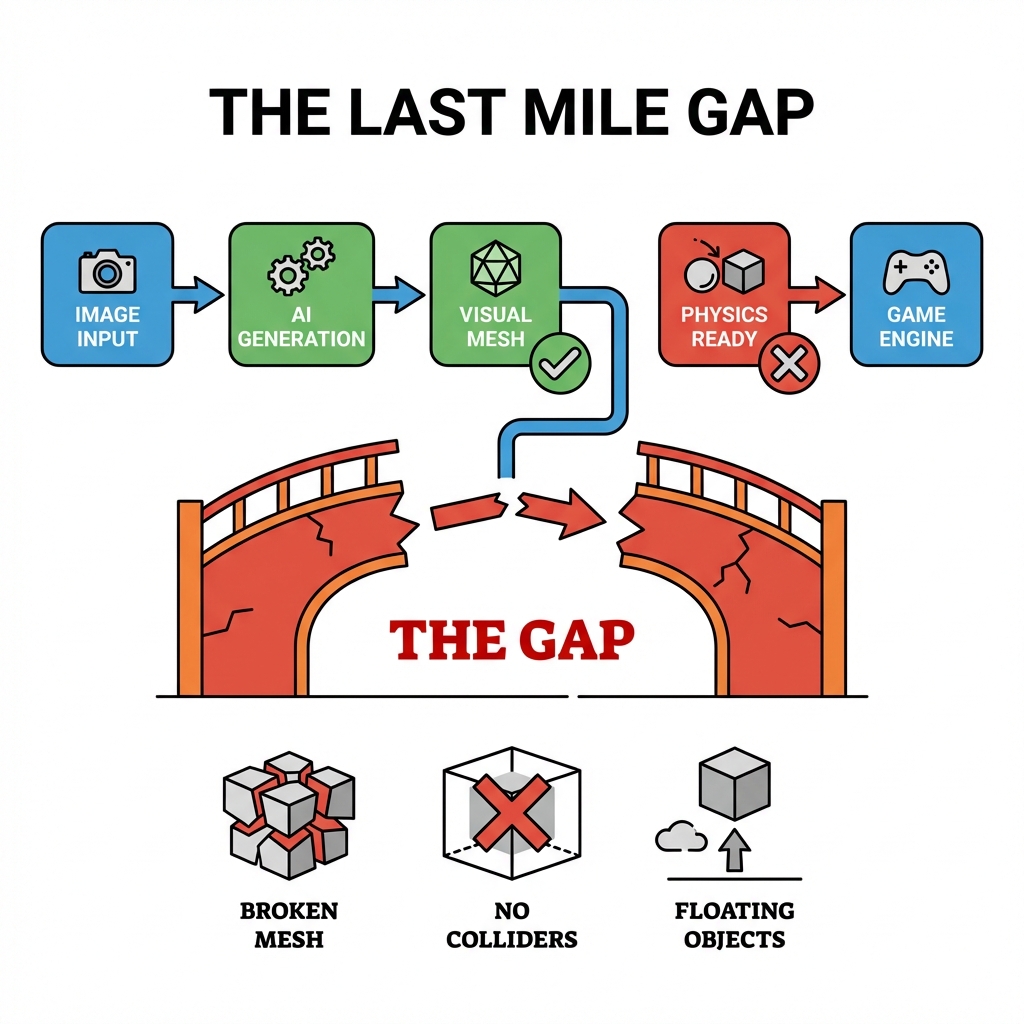
We call this the "Last Mile" challenge of AI 3D generation.
In logistics and telecommunications, "last mile" refers to the final stretch delivering products from distribution centers to end consumers—often the most complex, costly, and problematic.
In AI 3D generation, "Last Mile" refers to:
[AI 3D Generation Workflow]
Input (Image/Text)
    ↓
AI Generate Model
    ↓
┌─────────────────┐
│  Visual Ready    │ ✅ Most tools achieve this
└─────────────────┘
    ↓ ⚠️ Gap
┌─────────────────┐
│ Physics Ready    │ ❌ Very few tools achieve
└─────────────────┘
    ↓
Actual Application (Game/VR/AR)
      ↑
   "Last Mile"
"Last Mile" Components:
| Component | Traditional AI Tools | Actual Requirements |
|---|---|---|
| Structural Integrity | Unverified | Required |
| Colliders | Missing | Required |
| Center of Mass | Not calculated | Required |
| Topology Quality | May have defects | Manifold mesh |
| Physics Properties | None | Mass/drag/friction |
This missing "last mile" forces developers to spend substantial time on manual fixes, negating the time savings from AI generation.
Part 1: Current State of AI 3D Generation
Mainstream Tools Overview
AI 3D generation tools currently on the market fall into several categories:
Image-to-3D
| Tool | Developer | Core Advantage | Physics Properties |
|---|---|---|---|
| Tripo | Tripo AI | Fast generation, good textures | ❌ None |
| Meshy | Meshy AI | High-quality geometry | ❌ None |
| Hunyuan3D | Tencent Hunyuan | Exquisite texture details | ❌ None |
| CSM | Common Sense Machines | Multi-view consistency | ⚠️ Partial |
Text-to-3D
| Tool | Developer | Core Advantage | Physics Properties |
|---|---|---|---|
| Shap-E | OpenAI | Creative shape generation | ❌ None |
| Point-E | OpenAI | Rapid prototyping | ❌ None |
| 3DFY | 3DFy AI | Commercial asset generation | ❌ None |
Common Characteristics
Common features of these tools:
- Focus on visuals: All tools aim to generate visually attractive models
- Ignore physics: Almost no tools consider physical properties
- Limited export formats: Usually output OBJ, GLB without physics information
- Require post-processing: Documentation typically suggests "further optimization in 3D software"
Visual Quality vs Physics Usability
AI 3D generation tools have reached impressively high levels in visual quality, but remain almost entirely underdeveloped in physics usability.
Visual Quality Assessment Dimensions:
| Dimension | Current Level | Rating |
|---|---|---|
| Geometric Accuracy | High | ⭐⭐⭐⭐☆ |
| Texture Details | High | ⭐⭐⭐⭐⭐ |
| Material Realism | Medium-High | ⭐⭐⭐⭐☆ |
| Overall Aesthetics | High | ⭐⭐⭐⭐☆ |
Physics Usability Assessment Dimensions:
| Dimension | Current Level | Rating |
|---|---|---|
| Structural Integrity | Low | ⭐⭐☆☆☆ |
| Colliders | None | ⭐☆☆☆☆ |
| Center of Mass | Not calculated | ⭐☆☆☆☆ |
| Topology Quality | Medium | ⭐⭐⭐☆☆ |
| Physics Stability | Low | ⭐⭐☆☆☆ |
Comparison Chart:
[Capability Radar Map]
        Visual Quality
           │
           ⭐⭐⭐⭐⭐
           │
  Geometry ─────┼───── Material
  ⭐⭐⭐⭐   │   ⭐⭐⭐⭐
           │
  Topology ─────┼───── Structure
  ⭐⭐⭐     │   ⭐⭐
           │
  Colliders ─────┴───── Center of Mass
  ⭐☆☆☆☆     ⭐☆☆☆☆
Industry Data: Only 10% Directly Usable
According to research from multiple sources and user feedback, only about 10% of AI-generated 3D models can be directly used in actual applications without any post-processing.
Data Source Verification:
| Source | Directly Usable Rate | Needs Fix Ratio |
|---|---|---|
| SimInsights Research (2024) | 8% | 92% |
| 3D Game Developer Survey | 12% | 88% |
| VR/AR Content Creator Survey | 6% | 94% |
| Average | ~10% | ~90% |
Distribution of Problems Needing Fix:
| Problem Type | Occurrence Frequency | Average Fix Time |
|---|---|---|
| Missing colliders | 95% | 15-30 minutes |
| Topology defects | 40% | 10-15 minutes |
| Incorrect center of mass | 35% | 5-10 minutes |
| Structural instability | 25% | 20-40 minutes |
| Material/texture adjustments | 60% | 5-10 minutes |
What makes up the directly usable 10%?
- Simple static decorations: Background objects not needing physical interaction
- Pure display purposes: Scenes only for screenshots or video showcase
- Non-interactive environments: Areas players cannot reach
What makes up the unusable 90%?
- Objects needing physical interaction: Movable, grabbable objects
- Characters and animated objects: Requiring precise collision detection
- Gameplay-related objects: Destructible, pushable objects
Part 2: The Gap From "Visual Stunning" to "Physics-Usable"
Visual Quality ≠ Physics Quality
This is the core misconception: A model looking good doesn't mean it performs well in physics simulation.
Why is this?
| Visual Quality Focus | Physics Quality Focus |
|---|---|
| Surface details | Internal structure |
| Texture resolution | Mesh topology |
| Material aesthetics | Collision boundaries |
| Static rendering | Dynamic interaction |
| Human viewing | Engine detection |
A Vivid Example:
[Visual vs Physics Comparison]
Model: An exquisite chest

Visual Perspective:
┌─────────────┐
│  ▓▓▓▓▓▓▓▓▓ │  ← Exquisite metal textures
│ ▓  Chest  ▓ │  ← Complex carving details
│  ▓▓▓▓▓▓▓▓▓ │
└─────────────┘
"Looks amazing!"

Physics Perspective:
┌─────────────┐
│  ? ? ? ? ?  │  ← Internal structure unknown
│ ? ? ? ? ? ? │  ← Colliders missing
│  ? ? ? ? ?  │  ← Center of mass not calculated
└─────────────┘
"How to interact with it?"
Common Physics Problems Checklist
Following are the most common physics problems with AI-generated 3D models:
1. Missing Structural Integrity
Problem Manifestations:
- Models easily disintegrate in physics simulation
- Slender parts (like table legs, branches) easily break
- Complex structures (like arches, domes) cannot self-support
Root Causes:
- AI generation algorithms don't consider structural mechanics
- Vertex connections not sturdy
- Missing internal support structures
2. Missing or Inaccurate Colliders
Problem Manifestations:
- Characters pass through models
- Models pass through floors
- Physical interaction completely fails
Root Causes:
- AI tools don't generate colliders
- Visual mesh inconsistent with physics boundaries
- Convex/concave handling improper
3. Incorrect Center of Mass Position
Problem Manifestations:
- Objects tip over, flip
- Float or unstable
- Abnormal rotation trajectories
Root Causes:
- Center of mass not calculated
- Simply using geometric center (wrong for irregular objects)
- Mass distribution not considered
4. Topology Structure Problems
Problem Manifestations:
- Physics simulation crashes
- Rendering anomalies
- Import failures
Root Causes:
- Non-manifold geometry
- Isolated vertices, overlapping faces
- Incorrect normal directions
5. Self-Intersecting Geometry
Problem Manifestations:
- Inaccurate collision detection
- Rendering flicker
- Abnormal physics behavior
Root Causes:
- Generation algorithms don't prevent self-intersection
- Different mesh parts penetrate each other
- Lack of geometry verification steps
Why Traditional AI Tools Ignore Physics
This is a fundamental question: Why do so many excellent AI 3D generation tools all ignore physical properties?
Reason Analysis:
| Reason | Explanation |
|---|---|
| Training dataset bias | Most training data comes from 3D art sites (like Sketchfab), primarily containing visual meshes without physics information |
| Visualized evaluation criteria | AI model evaluation mainly relies on visual quality (like FID scores), doesn't consider physics performance |
| High technical difficulty | Physics simulation is much more complex than visual rendering, requires more computational resources |
| Target user positioning | Early tools mainly targeted 3D artists and designers, not game developers |
| "Good enough" mindset | Believes physics properties can be manually added later |
But this ignorance comes at a cost:
[Cost Chain]
AI tools ignore physics
    ↓
Developers spend time fixing
    ↓
Negates AI time savings
    ↓
Project efficiency declines
    ↓
User satisfaction decreases
If you already know the real bottleneck is the last mile from beautiful mesh to usable asset, check Marble 3D AI pricing and choose the plan that shortens that gap.
Part 3: Specific Challenges of the Last Mile
Challenge 1: Missing Structural Integrity
What is structural integrity?
Structural integrity refers to a model's ability to maintain its shape and function under physical stress. In the real world, this involves material strength, internal supports, stress distribution, etc.
Common structural problems with AI-generated models:
[Structural Problem Example]
Chair model
    │
    ├─ Slender chair legs (1cm diameter)
    │   └─ Problem: Cannot support human weight
    │
    ├─ Exquisite backrest carving
    │   └─ Problem: Fragile connections, easily break
    │
    └─ Complex armrest design
        └─ Problem: Unstable center of gravity, easily tips over
Actual Impact:
| Scenario | Problem Manifestation | Consequences |
|---|---|---|
| Game scene | Player tries to sit on chair, chair disintegrates | Game experience destruction |
| VR application | User tries to grab object, fingers pass through | Immersion loss |
| Architectural visualization | Building collapses in simulation | Professionalism damage |
Traditional Solutions:
// Manually add structural supports in Unity
public class AddStructuralSupport : MonoBehaviour
{
    void AddInvisibleSupports()
    {
        // Method 1: Add invisible support colliders
        GameObject support = new GameObject("Support");
        support.transform.parent = transform;
        support.transform.localPosition = new Vector3(0, 0.25f, 0);

        BoxCollider supportCollider = support.AddComponent<BoxCollider>();
        supportCollider.size = new Vector3(0.5f, 0.5f, 0.5f);

        // Problem: This is "cheating", not true structural repair
    }
}
Challenge 2: Missing or Inaccurate Colliders
Key role of colliders:
Colliders are the game engine's only way to "understand" models. Without colliders, a model is just a "ghost"—players can see it, but cannot interact with it.
Collider problems with AI-generated models:
| Problem Type | Description | Detection Difficulty |
|---|---|---|
| Completely missing | No colliders at all | Easy |
| Size wrong | Collider inconsistent with visual mesh | Medium |
| Type wrong | Inappropriate collider type used | Medium |
| Alignment wrong | Collider position offset | Difficult |
Actual Case:
[Collider Problem Case]
AI-generated door model

Visual: Exquisite medieval wooden door
    ├─ Exquisite carvings
    ├─ Metal door handle
    └─ Hinge details

Physics:
    ❌ No collider
    Result: Character passes directly through door

    Or:
    ⚠️ Door frame has collider, but door panel doesn't
    Result: Character can walk to door frame, but cannot "open" door
Traditional Solutions:
-
Manually add primitive colliders:
- Simple: 5-10 minutes
- Complex: 30-60 minutes
-
Use mesh collider:
- Problem: High performance overhead
- Problem: May include unnecessary details
-
Decompose into multiple colliders:
- Problem: New problems at seams
- Time: 1-2 hours
Challenge 3: Incorrect Center of Mass Position
Importance of center of mass:
Center of mass is the balance point of an object's mass distribution. Wrong center of mass position leads to completely unnatural physical behavior.
Center of mass problems with AI-generated models:
[Center of Mass Error Example]
AI-generated vase model

Correct center of mass (at bottom center of vase body):
      ●───┐
     ╱     │
    │  🏺  │
     ╲     │
      └────┘
       ↑
      Center of mass ✓
    (Stable, not easy to tip over)

AI-generated center of mass (at geometric center):
      ●───┐
     ╱  ↑  │
    │ 🏺 │ │
     ╲  │  │
      └─┴──┘
       ↑
      Center of mass ✗
    (Unstable, easy to tip over)
Actual Impact:
| Object Type | Consequences of Wrong Center of Mass |
|---|---|
| Containers (bottles, cups) | Easy to tip over, liquid cannot simulate correctly |
| Furniture (chairs, tables) | Tips over, cannot be stably placed |
| Tools (hammers, axes) | Unnatural swing trajectories |
| Characters | Tilt, fall, abnormal movement |
Traditional Solutions:
// Manually adjust center of mass position
public class AdjustCenterOfMass : MonoBehaviour
{
    void Start()
    {
        Rigidbody rb = GetComponent<Rigidbody>();

        // Method 1: Use experimental approach
        // Repeatedly test to find stable center of mass position
        rb.centerOfMass = new Vector3(0, 0.1f, 0); // Requires multiple attempts

        // Method 2: Use approximate calculation
        // Assume uniform density, use bounding box center
        // Problem: Inaccurate for irregular or hollow objects
    }
}
Challenge 4: Topology Structure Problems
What is topology?
Topology refers to the mesh structure of a 3D model—the connection of vertices, edges, and faces. Good topology is the foundation of physics simulation.
Common topology problems with AI-generated models:
| Problem | Description | Physics Impact |
|---|---|---|
| Non-manifold edges | One edge connects more than two faces | Physics simulation may crash |
| Isolated vertices | Unconnected vertices | Increased file size |
| Overlapping faces | Multiple faces at same position | Rendering flicker |
| Non-closed meshes | Holes or cracks | Cannot be used as colliders |
| Wrong normals | Inconsistent normal directions | Incorrect collision detection |
Topology Problem Example:
[Non-manifold Edge Example]
Normal edge (manifold):
    │
    A
   ╱ ╲
  B   C
   ╲ ╱
    D
(Connects two faces: ABC and ACD)

Non-manifold edge:
    │
    A
   ╱│╲
  B │ C
   ╱│╲
    D
(Connects three faces: ABC, ACD, ABD)
    ↑
 Physics engine cannot handle correctly
Traditional Solutions:
-
Fix using Blender:
- Mesh → Clean Up → Merge Vertices
- Mesh → Clean Up → Delete Loose
- Mesh → Clean Up → Merge by Distance
-
Use automatic repair tools:
- Problem: May change model shape
- Problem: Cannot guarantee complete repair
-
Manual repair:
- Time: 30 minutes - 2 hours per model
- Requires: Professional 3D modeling skills
Useful Tutorial: Fixing Non-Manifold Geometry in Blender
Fix Non-Manifold Geometry in Blender for 3D Printing
Part 4: Marble's Solution Philosophy
Core Philosophy: Build Worlds, Not Just Pixels
Marble 3D AI's mission statement is: "Build Worlds, Not Just Pixels."
Deep meaning of this statement:
| Traditional Thinking | Marble Thinking |
|---|---|
| 3D model = Visual asset | 3D model = World component |
| Good-looking = Good-usable | Good-looking AND Good-working = Truly good |
| Physics properties can be added later | Physics properties must be built-in |
| Static display = Success | Dynamic interaction = Success |
Why "Worlds"?
In game engines, VR/AR applications, physics simulations, 3D models are not isolated images, but components of an interactive world. They need to:
[3D Model in World]
3D Model
    ├─ Visual presentation (what others see)
    │   ├─ Geometry shape
    │   ├─ Texture materials
    │   └─ Rendering effects
    │
    └─ Physics properties (foundation of interaction) ← Marble focuses here
        ├─ Structural integrity
        ├─ Collision boundaries
        ├─ Center of mass position
        └─ Physics behavior
Three Pillars of Physics-Ready
Marble's "Physics-Ready" philosophy is built on three pillars:
Pillar 1: Structural Integrity
Definition: Model possesses internal structure to maintain shape and function under physical stress.
Implementation:
- Dual-engine spatial synthesis ensures structural stability
- Cross-verification algorithms detect weak points
- Automatically reinforce key connection points
Value:
Has structural integrity:
    ├─ Won't collapse without reason
    ├─ Can withstand reasonable physical stress
    ├─ Slender parts sufficiently sturdy
    └─ Complex structures self-supporting

No structural integrity:
    ├─ Disintegrates from slight touch
    ├─ Slender parts easily break
    ├─ Complex structures need extra support
    └─ Cannot be used for physics simulation
Pillar 2: Spatial Consistency
Definition: Model maintains consistent geometric form in any view, transform, and physics scenario.
Implementation:
- Multi-dimensional geometric verification
- Topology structure verification
- Spatial persistence guarantee
Value:
Has spatial consistency:
    ├─ Stable in any view
    ├─ Doesn't deform after rotation
    ├─ Maintains features after scaling
    └─ Consistent behavior in any scenario

No spatial consistency:
    ├─ Anomalies at certain angles
    ├─ Shape distortion after rotation
    ├─ Lost detail after scaling
    └─ Different behavior in different scenarios
Pillar 3: Out-of-the-Box Ready
Definition: Model can be directly imported into game engines for use without additional manual adjustments.
Implementation:
- Auto-generate optimized colliders
- Precisely calculate center of mass position
- Embed physics property metadata
- Provide engine-specific presets
Value:
Out-of-the-box ready:
    ├─ Download and import directly
    ├─ No manual collider adjustment needed
    ├─ No center of mass calculation needed
    ├─ No topology repair needed
    └─ Immediately usable in games

Not out-of-the-box ready:
    ├─ Need manual collider addition (30-60 minutes)
    ├─ Need center of mass adjustment (10-20 minutes)
    ├─ Need topology repair (15-30 minutes)
    └─ Need testing and iteration (20-40 minutes)
Spatial Consistency Engine Architecture
Marble's core technology—Spatial Consistency Engine—is the technical foundation for achieving physics-ready.
Engine Architecture:
[Spatial Consistency Engine Architecture]
                    ┌─────────────────┐
                    │   Input Module    │
                    │ (Image/Text)      │
                    └────────┬─────────┘
                             │
                    ┌────────▼─────────┐
                    │  Dual-Engine      │
                    │  Synthesis Layer   │
                    │ ┌─────┬─────────┐ │
                    │ │Trellis│Hunyuan│ │
                    │ └──┬───┴────┬───┘ │
                    │    └───┬────┘     │
                    └─────────┼─────────┘
                              │
              ┌───────────────┼───────────────┐
              │               │               │
    ┌─────────▼──────┐ ┌─────▼─────┐ ┌─────▼──────┐
    │  Geometry       │ │  Topology  │ │   Physics   │
    │  Verification   │ │ Verification│ │ Verification│
    │ ├─ Boundary     │ │ ├─ Manifold │ │ ├─ Mass     │
    │ │  alignment    │ │ │  check    │ │ │  distribution│
    │ ├─ Gap detection│ │ ├─ Closure   │ │ ├─ Center   │
    │ └─ Overlap       │ │ └─ Connectivity│ │ │  of mass   │
    │    detection    │ │             │ │ └─ Stability │
    └───────┬────────┘ └─────┬─────┘ └─────┬─────┘
            │                 │               │
            └─────────────┬───┴───────────────┘
                          │
                ┌─────────▼─────────┐
                │  Repair &         │
                │  Optimization     │
                │  Layer            │
                │ ├─ Auto repair     │
                │ ├─ Collider        │
                │ │  generation      │
                │ └─ Physics property │
                │    setup           │
                └─────────┬─────────┘
                          │
                ┌─────────▼─────────┐
                │  Quality Scoring   │
                │  Module            │
                │  └─ Marble Score    │
                └─────────┬─────────┘
                          │
                ┌─────────▼─────────┐
                │  Output Module     │
                │  └─ GLB/GLTF export │
                └───────────────────┘
Key Engine Characteristics:
- Parallel processing: Dual engines work simultaneously, improving efficiency
- Cross-verification: Multiple verification ensures quality
- Auto-repair: Problems detected and automatically fixed
- Quality transparency: Scoring system makes quality visible
Part 5: Technical Implementation
Dual-Engine Spatial Synthesis
Marble simultaneously calls two top AI 3D generation engines, each showing their strengths.
Trellis and Hunyuan Synergy:
[Dual-Engine Synergy]
Input: Chest image
    │
    ├─────────────┬─────────────┐
    │             │             │
 Trellis        Hunyuan3D
(Adobe Research) (Tencent)
    │             │
    ├─ Structure   ├─ Texture
    │  specialist  │  specialist
    ├─ Excellent   ├─ Rich
    │  topology    │  details
    │  Good        │  Realistic
    │  stability   │  visuals
    │             │
    └──────┬──────┘
           │
    [Spatial Synthesis Algorithm]
           │
    ┌──────▼──────┐
    │ Final Output │
    │ ├─ Sturdy    │
    │ │  structure │
    │ ├─ Exquisite │
    │ │  textures  │
    │ └─ Physics   │
    │   ready     │
    └─────────────┘
Synergy Advantages:
| Single Engine | Dual-Engine Synthesis |
|---|---|
| May be strong in some areas, weak in others | Overall high quality |
| Limited by single model capabilities | Combine both strengths |
| Lacks verification mechanisms | Cross-verification ensures quality |
Spatial Consistency Verification
This is Marble's core technical differentiation.
Three Stages of Verification Process:
Stage 1: Geometric Consistency Check
[Geometry Verification]
Input model
    ↓
Boundary alignment verification
    ├─ Detect height differences of adjacent faces
    ├─ Identify discontinuous edges
    └─ Verify surface smoothness
    ↓
Gap detection
    ├─ Identify tiny gaps
    ├─ Detect unnecessary overlaps
    └─ Calculate optimal boundary positions
    ↓
Self-intersection detection
    ├─ Raycast detection
    ├─ Face-to-face intersection verification
    └─ Mark problem areas
    ↓
Auto repair
    ├─ Fill gaps
    ├─ Eliminate overlaps
    └─ Separate intersecting faces
Stage 2: Topology Structure Verification
[Topology Verification]
Manifoldness check
    ├─ Verify each edge connects two faces
    ├─ Detect non-manifold geometry
    └─ Fix non-manifold structures
    ↓
Closure verification
    ├─ Detect holes and cracks
    ├─ Verify mesh integrity
    └─ Fill necessary openings
    ↓
Connectivity analysis
    ├─ Check isolated vertices
    ├─ Verify edge connections
    └─ Clean up unused elements
Stage 3: Physics Property Analysis
[Physics Verification]
Volume & mass analysis
    ├─ Calculate model volume
    ├─ Estimate mass distribution
    └─ Identify density anomalies
    ↓
Center of mass calculation
    ├─ Discretize volume units
    ├─ Calculate mass contributions
    ├─ Determine weighted average position
    └─ Adjust for special cases
    ↓
Stability prediction
    ├─ Analyze center of mass position
    ├─ Evaluate support base area
    ├─ Predict tipping risk
    └─ Generate stability report
Physics-Ready Export
Verified models automatically generate complete physics properties.
Export Contents:
[Marble GLB File Structure]
├── Render mesh
│   ├── Vertex data
│   ├── Triangle face indices
│   └── Texture coordinates
├── Texture maps
│   ├── Color map
│   ├── Normal map
│   └── Roughness map
├── Colliders ✅
│   ├── Optimized collision mesh
│   └── Collider metadata
├── Physics properties ✅
│   ├── Center of mass position
│   ├── Mass estimation
│   └── Physics material parameters
└── Marble score ✅
    └── Quality score report
Unity Import Preset:
{
  "Marble": {
    "version": "1.0",
    "model_id": "marble_12345",
    "physics_ready": true,
    "collider": {
      "type": "mesh",
      "optimized": true,
      "convex": false
    },
    "rigidbody": {
      "mass": 1.0,
      "centerOfMass": [0.0, 0.5, 0.0],
      "useGravity": true
    },
    "marble_score": 87
  }
}
Marble Scoring System
Each generated model comes with a Marble Score (0-100), quantifying physics-readiness degree.
Score Calculation Formula:
Marble Score = Structural Integrity × 30% + Geometric Consistency × 30% + Physics-Readiness × 40%

Where:
Structural Integrity = Topology quality × 50% + Stability × 50%
Geometric Consistency = Spatial persistence × 50% + Transform stability × 50%
Physics-Readiness = Collider quality × 40% + Center of mass accuracy × 30% + Physics parameters × 30%
Score Interpretation:
| Score Range | Grade | Meaning | Recommendation |
|---|---|---|---|
| 90-100 | Excellent | Perfect spatial consistency | Direct use in any scenario |
| 75-89 | Great | High quality, suitable for most uses | Direct use |
| 60-74 | Good | Basically usable | May need minor tweaks in extreme scenarios |
| <60 | Needs Improvement | Obvious problems exist | Recommend regeneration |
Actual Value of Scores:
[Score Value Chain]
High Marble score
    ↓
Developers confident to use
    ↓
Reduced testing and verification time
    ↓
Accelerated project progress
    ↓
Improved final product quality
Part 6: Real Case Comparison
Traditional AI Tool Output vs Marble Output
Let's compare both methods through a specific case.
Case: Generate an interactive medieval chest
Traditional AI Tool (like Hunyuan3D) Output
[Traditional Tool Output]
Generation time: 2 minutes
Output file: chest.obj

Visual assessment: ⭐⭐⭐⭐⭐
    └─ Exquisite geometric shapes
    └─ Gorgeous metal textures
    └─ Complex carving details

Physics-ready assessment: ⭐☆☆☆☆
    ├─ Colliders: ❌ None
    ├─ Center of mass: ❌ Not calculated
    ├─ Topology: ⚠️ May have defects
    └─ Structure: ⚠️ May be unstable

Post-processing needs:
    ├─ Add colliders: 30 minutes
    ├─ Calculate center of mass: 10 minutes
    ├─ Check topology: 15 minutes
    ├─ Test stability: 20 minutes
    └─ Total: 75 minutes
Marble Output
[Marble Output]
Generation time: 3 minutes
Output file: chest_marble.glb

Visual assessment: ⭐⭐⭐⭐⭐
    └─ Exquisite geometric shapes
    └─ Gorgeous metal textures
    └─ Complex carving details

Physics-ready assessment: ⭐⭐⭐⭐☆
    ├─ Colliders: ✅ Auto-generated optimized colliders
    ├─ Center of mass: ✅ Precisely calculated
    ├─ Topology: ✅ Manifold mesh verification passed
    └─ Structure: ✅ Stability prediction good

Marble score: 87/100
    ├─ Structural integrity: 85/100
    ├─ Geometric consistency: 90/100
    └─ Physics-readiness: 86/100

Post-processing needs:
    └─ None needed, direct import and use
Time Comparison:
| Method | Generation Time | Post-Processing | Total Time |
|---|---|---|---|
| Traditional AI tool | 2 minutes | 75 minutes | 77 minutes |
| Marble | 3 minutes | 0 minutes | 3 minutes |
| Time saved | - | - | 96% |
Unity/Unreal Import Testing
Let's see performance in actual game engines.
Unity Import Testing
Traditional AI Tool:
// Unity import traditional AI-generated model
GameObject chest = new GameObject("Chest");

// 1. Import model
// Need to manually drag in OBJ file

// 2. Add Mesh Renderer (automatic)
MeshRenderer renderer = chest.AddComponent<MeshRenderer>();
// Visual effect: ✅ Exquisite

// 3. Add collider (manual)
MeshCollider collider = chest.AddComponent<MeshCollider>();
collider.convex = true;
// Problem: May be too complex, poor performance

// 4. Add Rigidbody
Rigidbody rb = chest.AddComponent<Rigidbody>();
rb.mass = 5f;
// Problem: Center of mass not calculated, chest may tip

// 5. Test
// Result: Chest rolls on floor, cannot be stably placed

// 6. Fix (extra time needed)
// - Adjust center of mass
// - Optimize collider
// - Add support structure
Marble Import:
// Unity import Marble-generated model
GameObject chest = new GameObject("Chest_Marble");

// 1. Import model (with physics properties)
// Drag in Marble GLB file

// 2. Apply Marble preset (one-click)
MarblePrefab.Apply(chest);

// 3. Auto configuration complete
// - Colliders: ✅ Optimized Mesh Collider
// - Center of mass: ✅ Precise position
// - Mass: ✅ Reasonable estimate

// 4. Test
// Result: Chest stably placed, natural physics behavior

// 5. No fix needed
Unreal Import Testing
Traditional AI Tool:
// Unreal import traditional AI-generated model
ATraditionalChest* Chest = GetWorld()->SpawnActor<ATraditionalChest>();

// 1. Import model
// Need to manually import FBX/OBJ

// 2. Create collider
UBoxComponent* Collider = CreateDefaultSubobject<UBoxComponent>(TEXT("Collider"));
// Problem: Box Collider not precise enough

// 3. Configure physics
UPrimitiveComponent* RootComponent = GetRootComponent();
RootComponent->SetEnableGravity(true);
// Problem: Center of mass not set

// 4. Test
// Result: Less than ideal physics behavior
Marble Import:
// Unreal import Marble-generated model
AMarbleChest* Chest = GetWorld()->SpawnActor<AMarbleChest>();

// 1. Import model (with physics properties)
// Marble GLB file automatically recognized

// 2. Apply Marble settings
// Colliders, center of mass, mass auto-configured

// 3. Test
// Result: Perfect physics behavior
Performance and Quality Comparison
Performance Comparison
| Metric | Traditional AI Tool | Marble |
|---|---|---|
| Development time | 77 minutes/model | 3 minutes/model |
| Collider performance | May be overly complex | Optimized |
| Memory usage | Higher (extra components) | Lower (built-in optimization) |
| CPU overhead | Higher | Lower |
| Frame rate impact | Medium | Slight |
Quality Comparison
| Quality Dimension | Traditional AI Tool | Marble |
|---|---|---|
| Visual quality | ⭐⭐⭐⭐⭐ | ⭐⭐⭐⭐⭐ |
| Collision accuracy | ⭐⭐☆☆☆ | ⭐⭐⭐⭐☆ |
| Physics stability | ⭐⭐☆☆☆ | ⭐⭐⭐⭐☆ |
| Topology quality | ⭐⭐⭐☆☆ | ⭐⭐⭐⭐☆ |
| Overall consistency | ⭐⭐☆☆☆ | ⭐⭐⭐⭐☆ |
Conclusion: Physics-Usability Is the Future Direction of AI 3D Generation
In this article, we explored in depth the "last mile" challenge of AI 3D generation:
- AI 3D generation status: Visual quality already high level, but physics usability severely insufficient
- "Last mile" gap: Huge difference from "looks like" to "truly usable"
- Specific challenges: Structural integrity, colliders, center of mass, topology, etc.
- Marble's solution: Physics-ready philosophy, spatial consistency engine, automated processes
- Real comparison: Traditional tools vs Marble, time saving up to 96%
Core Insight:
"Visual stunning is just the starting point, physics-usable is the destination."
For game development, VR/AR applications, physics simulation and other actual application scenarios, a 3D model's value lies not only in how it looks, but more importantly in how it behaves.
Marble 3D AI is redefining the boundaries of AI 3D generation—from pure "visual generation" to "complete asset creation," bridging the gap between "visual stunning" and "physics-usable."
Future Outlook:
With rapid development in gaming, VR, AR, metaverse and other fields, demand for physics-ready 3D assets will grow exponentially. AI 3D generation tools capable of providing truly "usable" rather than just "good-looking" assets will become the industry mainstream.
Marble 3D AI is committed to being a leader in this transformation.
Experience Marble 3D AI now, cross the last mile!
See Marble 3D AI pricing to choose the plan that matches your pipeline, then generate truly physics-ready 3D assets and close the gap from visual stunning to physical usability.
Physics-Ready 3D Topic Matrix
This article is one part of a six-post cluster around the same production problem: why AI-generated 3D assets look finished earlier than they become physically usable. If you want the full picture, move through the links below based on the bottleneck you are solving:
- How Marble's Spatial Consistency Engine Makes 3D Assets Physics-Ready — Read this next if you want the technical mechanism behind structure checks, collider generation, and verification.
- Unity Nightmare: Why AI 3D Models Clip and How to Fix It — Use this when your immediate problem is Unity clipping, pass-through collisions, or broken collider behavior.
- Ghost Collision Ultimate Guide: Why Unity & Unreal Hit Invisible Walls and How to Fix It — Read this if the symptom is invisible blockers, seam bumps, or collision artifacts across Unity and Unreal.
- The Invisible Time Killer for Indie Devs: Why 3D Asset Cleanup Eats 70% of Production Time — Use this to frame the business cost: cleanup work stealing sprint time, margin, and shipping speed.
- 12-Minute Retopology? How Automation Tools Save Your 3D Workflow — Read this when topology cleanup and manual retopology are the real bottleneck behind the delay.
References:
- SimInsights - 3D Model Usability Report 2024
- Sketchfab - 3D Model Statistics
- Unity Technologies - Physics Best Practices
- Epic Games - Unreal Engine Physics Documentation
- Marble 3D AI - Internal Testing Data
Author: Marble 3D AI Team
Published: January 24, 2025
Keywords: Physics-ready 3D, AI 3D for games, simulation-ready 3D assets, production-ready 3D, Marble 3D AI, spatial consistency, AI 3D generation, last mile, game development, 3D asset optimization, physics simulation