Best Image Blaster Alternatives: AI 3D Models Compared
Generative AI has fundamentally disrupted the 3D content creation landscape, and it's here to stay. For game developers, architectural visualizers, and 3D printing hobbyists, this represents a massive, game-changing paradigm shift.
Imagine transforming a flat, two-dimensional concept sketch into a fully realized, three-dimensional base asset in under five minutes. It's incredibly fast. It's revolutionary.
Chaining multiple advanced generative APIs using composable tools like Image Blaster is a popular route for command-line developers. But let's be honest: setting up local terminal scripts is a tedious chore.
You don't want to spend your evening debugging Node.js runtimes. Wrestling with Python virtual environment paths is not fun. Plus, managing multiple pay-as-you-go developer credentials adds a massive operational hurdle that completely breaks your creative flow.
If you're looking for image blaster alternatives that bypass command-line complexity, you've come to the right place. We've got you covered. We'll show you web-based options that deliver clean, retopologized wireframes that integrate directly into your production engine. No manual vertex cleaning is required.
In this comprehensive guide, we'll map out the state of generative 3D modeling. We won't waste your time with marketing fluff — we'll focus strictly on technical facts. First, we'll dissect the critical "Last-Mile Gap" in automated asset pipelines. Then, we'll compare the top platforms, including Marble 3D AI, World Labs, Meshy, and Tripo3D, so you can choose the perfect fit for your workflow.
[!TIP] Looking for a Game-Ready, Zero-Setup Alternative?
Instead of spending your valuable development time debugging terminal environments and paying separate cloud computing bills, try the Marble 3D AI Web Generator. Generate physics-ready, watertight base meshes (GLB, OBJ, STL) in seconds with professional quad retopology and viewport wireframe tools built right into your browser.
1. Understanding the "Last-Mile Gap" in AI 3D Pipelines
Before comparing specific software options, we must address the primary technical bottleneck in automated 3D asset generation: solid manifold geometric integrity. In the development community, this is known as the "Last-Mile Gap." It's a critical, often frustrating hurdle that separates hobbyist toys from professional production tools.
Most entry-level generators don't build real geometry. They optimize exclusively for cosmetic browser previews, using rapid, high-density neural networks to generate superficial shapes that look great under diffuse WebGL lights. But they're fake. In reality, you're getting structurally empty, hollow shells.
When you download the raw files and import them into tools like Blender, Unity, Unreal Engine 5, or a slicer like Cura, the illusion shatters. The structural failures become painfully obvious:
[2D Reference Image] ➔ [Standard AI Generator] ➔ [Visual Shell Rendering]
                                                         ▲
                                                         |
                                             (The "Last-Mile Gap" Crash)
                                                         |
                                                         v
                                           [Open Geometry Mesh Holes]
                                           [Chaotic Triangle Soups]
                                           [Non-Manifold Boundary Edges]
                                           [Physics Collider Clipping]
The Three Geometry Bottlenecks:
-
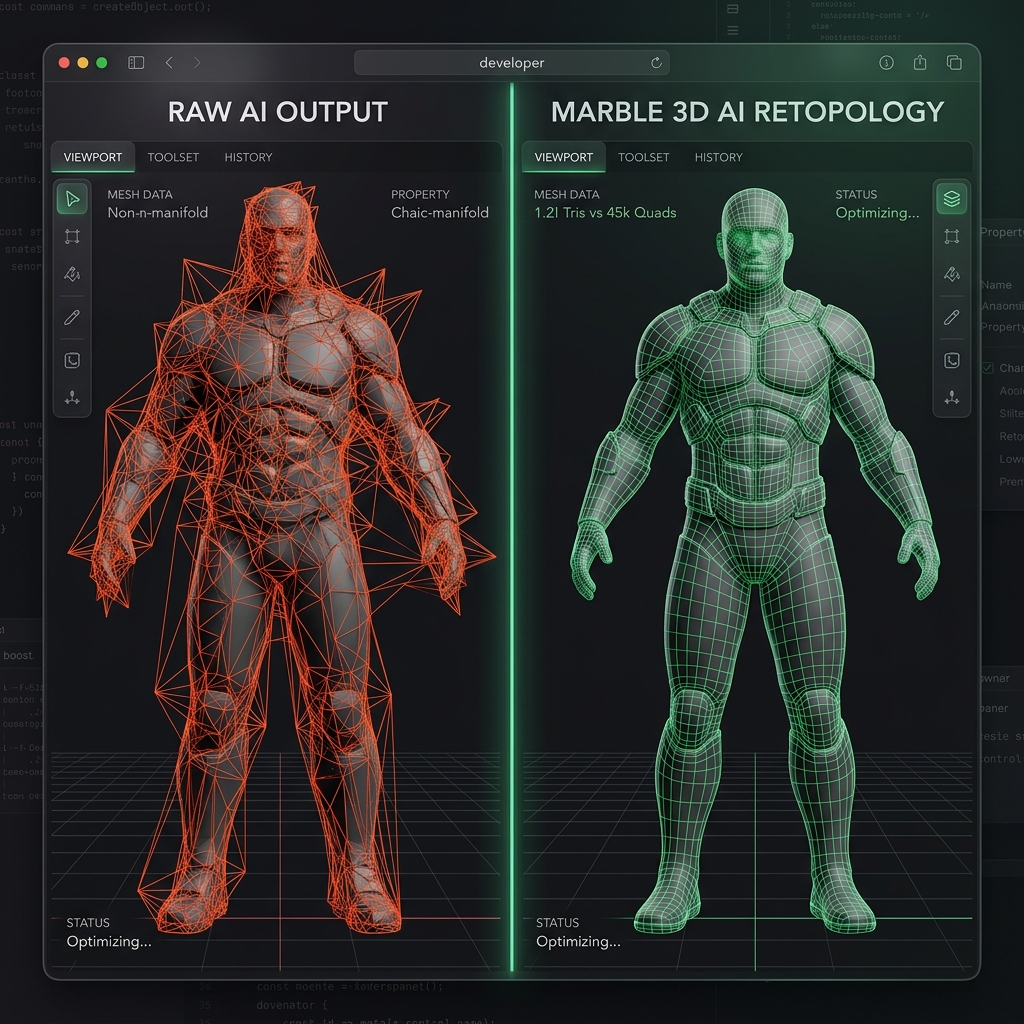
Chaotic Triangle Soup vs. Clean Topology: Standard generators distribute vertices randomly, which results in dense, unorganized triangle meshes that lag real-time pipelines and consume excessive memory. Editing or rigging them is a nightmare.
-
Non-Manifold Edges and Holes: A solid object must be topologically "watertight." Open boundaries and self-intersecting faces cause severe issues, meaning game physics engines can't calculate volume, which leads to glitchy collisions where characters fall through floor geometry.
-
Slicer Failures in 3D Printing: Slicing software relies on clear manifold structures to calculate infill. If your mesh has holes, your slicer'll fail. It'll omit entire layers or generate chaotic support paths that cause structural collapses during printing.
Let's look at a visual comparison showing how Marble 3D AI addresses this bottleneck, transforming raw, messy AI mesh wireframes into clean, quad-dominant, optimized base meshes:
2. The Strategic Alternatives Comparison Matrix
To help you navigate the landscape of modern 3D asset generators, we've benchmarked the top alternatives across six key operational dimensions:
| Tool / Platform | Local Setup Time | Primary Output Geometry | Target Audience | Cost Structure | Retopology & Decimation | Downstream Verification |
|---|---|---|---|---|---|---|
| Marble 3D AI | Instant (Browser) | Watertight, optimized polygonal meshes (.glb, .obj, .stl, .usdz, .ply) | Indie Game Devs, 3D Print Creators, XR Designers | Transparent monthly plans & free trials | ✓ Built-in automatic decimation slider & quad retopology | ✓ Interactive WebGL wireframe viewport |
| Image Blaster | 10–20 mins (CLI & Local Node.js) | Volumetric Scene Splat (.spz) + Loose .glb props + Audio | Command-Line Developers & Technical Artists | Pay-as-you-go developer credentials (FAL, World Labs, ElevenLabs) | ✗ None (Exports raw, unoptimized meshes) | ✗ None (Must rely on external viewers) |
| World Labs | Instant (Beta Web / API) | Navigable volumetric 3D environments (.spz splats) | Concept Artists & Environment Designers | Subscription tier & developer API | ✗ None (Not designed for polygonal prop manipulation) | Basic web-based camera navigation |
| Meshy | Instant (Web & Closed API) | Text-to-3D / Image-to-3D textured models | General 3D Hobbyists & Web Developers | Credit bundles & monthly subscriptions | Basic polygon reduction options | Basic browser preview |
| Tripo3D | Instant (Web & API) | Fast asset drafts & character auto-rigging | VFX Animators & Rapid Prototypers | Credit plans & open-weights local model | Basic decimation filters | Browser viewport |
3. Visualizing the AI 3D Landscape (Ease of Use vs. Control)
To understand where each alternative fits into your active design pipeline, we can map them along two primary development axes: Setup/Operational Simplicity and Mesh Customization/Control:
graph TD
    subgraph Easy Setup / Managed Platform
        Marble["Marble 3D AI: Premium Watertight Assets"]
        Meshy["Meshy: Web Mesh & Texture Platform"]
        Tripo["Tripo: Rapid Character Prototyping"]
    end

    subgraph Deep Setup / Custom Orchestration
        Blaster["Image Blaster: Composable CLI Workflow"]
        World["World Labs: Dedicated Environmental Splats"]
        Local["TripoSR: Local Offline Model Runtimes"]
    end

    style Marble fill:#22c55e,stroke:#15803d,stroke-width:2px,color:#fff
    style Blaster fill:#3b82f6,stroke:#1d4ed8,stroke-width:2px,color:#fff
    style World fill:#a855f7,stroke:#7e22ce,stroke-width:2px,color:#fff
4. Deep-Dives: Choosing an Alternative by Creative Role
Different creative pipelines have distinct priorities. Let's analyze which tool is best suited for your specific production role:
1. The Game-Ready Prop Pipeline: Marble 3D AI
If you're an indie developer building scenes for Unity, Unreal, or Godot, you need clean props. You don't want assets that lag frame rates or cause collision glitches. Marble 3D AI is the leading alternative for this workflow.
-
Dual-Engine Pipeline: Instead of locking you into one model, Marble uses a dual-engine architecture. It features Trellis for organic shapes and Hunyuan 3D for geometric structures. This gives you the best of both worlds.
-
Automatic Retopology and Decimation: This bypasses the grueling vertex cleaning loop in Blender. You can adjust the decimation slider inside our WebGL viewport. It reduces drafts into lightweight, game-ready base meshes in seconds.
-
Pre-Aligned Pivot Scales: Standard generators export models with offset pivots or incorrect scales. This forces you to manually re-center them in external editors. Marble exports assets with clean, engine-ready coordinate scales.
Trellis vs. Hunyuan 3D: High-Fidelity Engine Comparison
To deliver the absolute best results for different asset types, Marble 3D AI features a dual-engine architecture. Let's compare these two core engines—Trellis and Hunyuan 3D—so you'll know exactly which to choose for your next project:
-
Trellis Engine (Intricate Organic Details): Trellis is a state-of-the-art generative model designed for complex structural features. It's incredibly powerful for organic meshes like characters, animals, and foliage. By utilizing advanced latent flow matching, it generates clean topology drafts with rich visual textures. While compile times are slightly longer (~60-90 seconds), you'll find the dramatic reduction in defects is well worth the wait, exporting optimized vertex alignments that are easy to decimate.
-
Hunyuan 3D Engine (Fast Geometric Hard-Surfaces): Hunyuan 3D is a highly optimized model created for speed and geometric rigidity. It's the perfect choice for hard-surface assets like crates, furniture, ruins, and weapons. With generation speeds under 30 seconds, it's perfect for rapid prototyping. It generates clean boundary corners and flat faces, minimizing non-manifold edges and quickly blocking out level maps.
The following table summarizes the technical differences between these two engines:
| Technical Feature | Trellis Engine | Hunyuan 3D Engine |
|---|---|---|
| Ideal Asset Type | Organic forms, characters, foliage | Hard-surface props, furniture, blocks |
| Generation Speed | 60 - 90 seconds | 20 - 30 seconds |
| Vertex Density | High (Detail-focused) | Medium (Structure-focused) |
| Topology Style | Smooth, continuous curves | Flat faces, sharp corners |
| UV Texturing | High-fidelity diffuse & normals | Clean color maps |
💡 Mini-Story: Neon Arcade Studio's Collision Glitch
The team at Neon Arcade Studio, a small indie shop in Austin, was developing Neon City Heist in Unity. They needed street lamps and barricades fast. They didn't have time to lose, so they ran their sketches through a command-line AI converter. Visually, the output looked fantastic.
But during playtesting, the runner kept clipping through barricades. This caused instant, frustrating crashes.
The programmer opened the wireframe and saw a total disaster. The meshes were a chaotic, non-manifold triangle soup containing over 450,000 vertices and dozens of open geometry holes. Unity's physics engine couldn't compute the volume. It just gave up.
The team spent hours cleaning vertices in Blender, which wasn't what they signed up for. It was actually slower than manual modeling. Their schedule was in ruins.
They switched to Marble 3D AI. They uploaded the exact same barricade sketches to our browser editor. By utilizing our dual-engine Trellis pipeline and adjusting the decimation slider, they'd generated watertight, quad-dominant GLB files under 15,000 polygons in seconds. The assets imported cleanly, the collision bugs vanished, and they'd shipped the game on schedule.
2. The Interactive Environment Specialist: World Labs
If your goal is exclusively environmental exploration, depth estimation, or creating walkable interactive panoramas from a single photo, using World Labs directly is the most logical route. You don't need a standalone object; you need a space.
-
Gaussian Splat Focus: Instead of extracting individual polygonal props, it captures the volumetric depth, lighting, and reflections of the entire scene, compiling it into an interactive Gaussian Splat (
.spzfile). -
Walkable Panoramas: It's perfect for digital real estate tours, wide-concept fantasy backdrops, or VR environmental greyboxing.
3. The Stable Developer API: Meshy
If you're an enterprise developer building an application that requires programmatically generating 3D models at scale, Meshy provides a robust, closed-source infrastructure. It doesn't require setting up local GPU clusters.
-
Guaranteed Uptime: Instead of experimental, open-source CLI scripts that break when third-party libraries update, Meshy offers a stable, documented web API. You won't have to debug custom Docker containers in the middle of the night.
-
Textured Focus: It's excellent for generating stylized, hand-painted textures for models.
💡 Mini-Story: Liam's WebGL Load Lag Crisis
Liam, a freelance developer in London, was building an interactive 3D portfolio site using Three.js. He wanted to display 3D models of hoodies and sneakers generated from product photos.
He first tried a standard command-line image-to-3D tool. The meshes generated, but the files were absolutely huge.
Each hoodie model was over 85 megabytes, which meant mobile browsers lagged and pages took 25 seconds to load. Liam knew visitors wouldn't wait around for that.
He imported the photos into Marble 3D AI instead. By utilizing our advanced decimation tools, he scaled the hoodie models down until he'd reduced polygon density by 80% while keeping crisp normal maps. The optimized GLB files weighed only 4.2 megabytes each.
When Liam redeployed, the 3D models loaded in under 2 seconds. The site was incredibly smooth and responsive on mobile devices, his client was absolutely thrilled, and it proved to be a clear win for optimized topology.
4. The 3D Printing and AR/XR Developer: Watertight STL and USDZ Pipelines
If you're designing physical models for 3D printing or building interactive augmented reality (AR) experiences for Apple Vision Pro and mobile devices, you've probably faced the nightmare of broken file geometry. Standard generators don't care about manifold physics. They leave open gaps that make slicers choke and AR engines crash. It's a massive waste of precious filament and processing power.
For 3D printing enthusiasts, Marble 3D AI provides a dedicated STL Watertight Generator. Modern slicing software (like Cura, PrusaSlicer, or Bambu Studio) relies on mathematically perfect volume calculation to plot infill paths.
If a mesh has non-manifold edges, your slicer won't understand what's inside versus what's outside. This results in missing layers, random support structures, or complete print head failures. Marble's pipeline automatically performs voxel-grid wrapping to seal holes, meaning you'll get flawless prints on the first try. It is that simple.
For AR and XR development, USDZ compatibility is another major hurdle you'll need to clear. Interactive platforms like ARKit or Apple Quick Look demand lightweight, well-mapped models to sustain 60 frames per second on mobile chips.
If your model's pivot point is offset by three meters, it'll spawn completely out of the user's camera view. That's a terrible user experience. Marble automatically centers mesh coordinates and align pivot points.
It packages your models into optimized USDZ files that load instantly with zero viewport stutter. AR engines demand this. Pivots must be perfect.
5. Head-to-Head Comparisons
Let's compare Image Blaster directly against its main alternatives:
1. Image Blaster vs. Marble 3D AI
-
The Workflow: Image Blaster requires terminal setup, Node.js packages, and paid API keys. Marble 3D AI is a unified browser workspace. You'll just drag and drop your image. It's that easy.
-
Mesh Optimization: Image Blaster outputs raw, heavy triangle meshes. Marble doesn't do that — it features built-in decimation sliders and automatic retopology, giving you clean, lightweight assets in seconds.
-
Downstream Use: Image Blaster is great for wide environment splats (
.spz). Marble is built for individual, physics-ready props (.glb/.stl) and slicer-ready 3D prints.
2. Image Blaster vs. Meshy
-
The Infrastructure: Meshy is a closed-source SaaS platform with basic browser access. Image Blaster is a highly customizable, open-source terminal script. It's built for developers who like control.
-
Customizability: Image Blaster is modular. You'll find it's easy to change one line of code to swap mesh generators on FAL. With Meshy, you're locked into their proprietary backend pipeline.
-
Verdict: Choose Meshy if you want a hosted platform for rapid mesh drafts. Choose Image Blaster if you want a highly customized local terminal script.
6. High-Quality Video Walkthrough: Interactive Comparison
To see a direct visual comparison of generated object meshes, Gaussian splat environment walking navigation, and performance analysis between composable terminal scripts and browser tools, watch this excellent visual guide:
[!IMPORTANT] Must-Watch AI 3D Generation Pipeline Comparison
- Video Tutorial: One Photo, 5 Minutes, a Walkable 3D World — The New Claude Skill That Chains 4 AI Models
- What is covered:
- Detailed side-by-side visual analysis of wireframe topologies.
- Real-time loading speed comparisons across different 3D engines.
- Walkthrough of the differences between volumetric Gaussian splats (
.spz) and standard polygonal meshes (.glb/.obj).
7. Direct Action: How to Optimize Your Pipeline
The generative 3D landscape is moving fast. Choosing the right tool depends on your project's bottlenecks.
-
If you love terminal scripting and want to build volumetric environments, set up Image Blaster. It is a great sandbox.
-
If you need watertight, optimized base meshes without terminal hassle, choose Marble 3D AI.
Take Action Today:
-
Upload Free: Visit the Marble 3D AI Interactive Workspace. Upload your first concept image to get a high-fidelity mesh in under 60 seconds.
-
Review Subscriptions: Check out our affordable monthly plans on the Marble 3D AI Pricing Page. This unlocks high-resolution exports and decimation.
-
Continue Learning:
- Workflow Breakdown: Learn how the pipeline operates in What Is Image Blaster? The AI 3D Workflow.
- API Setup Guide: Learn how to configure your local credentials in Image Blaster API Keys: The Developer's Setup Guide.
8. Frequently Asked Questions (FAQ)
Which alternative is best for 3D printing slicing software?
Marble 3D AI is the premier choice for 3D printing workflows. It features a dedicated STL Mode that automatically closes holes, stitches open vertices, and generates watertight solid geometry, ensuring your exports import directly into Cura or PrusaSlicer without error.
Can Image Blaster environment splats (.spz) be opened directly in Unity or Unreal?
Not natively. Volumetric Gaussian splats (.spz files) represent point cloud volumes, not traditional polygonal meshes. To view and navigate them inside game engines like Unity or Unreal Engine 5, you must install third-party splat viewer plugins (such as Luma AI's integration or World Labs' dedicated viewer packages).
Is Tripo3D better suited for organic or hard-surface models?
Tripo3D is highly effective for rapid character prototyping and organic shapes, offering automated character rigging tools that apply skeletal armatures to your meshes. For highly structured geometric models or hard-surface props, Marble 3D AI's dual-engine architecture (Trellis + Hunyuan 3D) provides superior geometric fidelity and clean pivots.
Do I have to pay to use Marble 3D AI?
We offer free trial generation credits to all newly registered users, allowing you to test your concept art and preview the wireframe mesh directly in your browser. High-resolution multi-format downloads (GLB, OBJ, STL, USDZ, PLY) and our advanced retopology engines are unlocked through our affordable pricing tiers.
Disclaimer: This article is an independent comparative review created by Marble 3D AI. It is not affiliated with, endorsed by, or officially connected to the Image Blaster GitHub project or any other third-party platform mentioned. All product names, logos, and trademarks belong to their respective owners.