What Is Image Blaster? The AI 3D Workflow Explained
What if a single flat photo of a medieval cottage or a futuristic robot crab could be instantly transformed into a fully navigable, physics-ready 3D environment complete with detailed object meshes, realistic material textures, and spatialized ambient soundscapes—all in under five minutes?
If you're a game developer, 3D modeler, or technical artist, you already know the traditional asset pipeline is a grueling time-sink. Creating environment geometry, modeling individual prop meshes, UV mapping, baking textures, and adding sound effects can take hours or even days for a single scene blockout. It's a massive drag on creative momentum.
Image Blaster has suddenly exploded in popularity because it promises to smash this bottleneck. It chains multiple generative AI APIs together, coordinated by a terminal-based AI coding assistant. But what exactly is it, how does it orchestrate separate pipelines, and should you integrate it into your development workflow? Let's dive deep into this technical analysis.
1. The Genesis: What Is Image Blaster?
At its core, Image Blaster is an open-source, terminal-based AI 3D orchestration workflow. It was created by Nicholas Neilson (a member of the World Labs research team, developed as an independent personal side project). It's hosted on GitHub in the official repository: neilsonnn/image-blaster.
Instead of relying on a single "jack-of-all-trades, master-of-none" AI model, Image Blaster acts as the system glue. It's designed to run locally inside command-line environments like Claude Code (the terminal-based developer agent by Anthropic). By leveraging Claude's vision capabilities and local shell access, it coordinates, crops, edits, and distributes different visual segments. Those segments go straight to specialized external APIs, saving you manual slicing work.
The pipeline doesn't just output a single standalone model; it compiles an entire explorable folder of synchronized assets, including:
- A volumetric 3D Gaussian Splat (
.spzfile) representing the environment. - Multiple textured foreground meshes (
.glbor.objfiles) representing physical props. - Realistic, spatialized ambient sound effects (
.mp3or.wavfiles) matching the scene's audio profile.
💡 Mini-Story: Marcus’s Pipeline Bottleneck
In November 2025, Marcus, a solo indie developer working on his fantasy RPG Ruins of Eldoria, was designing a forgotten forest campsite scene. Modeling the central campfire, three mossy logs, and a derelict leather tent took him 14 hours in Blender. When he wanted to test the lighting layout, he had to export individual assets, import them into Unity, place colliders, and manually synchronize crackling fire audio nodes.
The next week, Marcus tested the new Image Blaster pipeline. He fed the script a single Midjourney-generated concept sketch of a campfire. In just 4 minutes and 12 seconds, Claude Code processed the environment splat, extracted a watertight GLB campfire mesh, generated wind-rustle SFX, and compiled a walkable prototype layout. The "last-mile" blockout was complete before Marcus could even finish brewing his cup of coffee.
If you want to try a similar browser-based image-to-3D pipeline with zero command-line configuration, you can jump straight into the Marble 3D AI browser generator for instant clean-topology meshes. But if you want to master the local CLI setup, let's dissect the technical pipeline.
2. The Orchestration Pipeline: How Image Blaster Works
Image Blaster splits the monumental task of 3D scene generation into distinct, highly optimized steps. Below is a detailed technical diagram mapping out how Claude Code orchestrates the visual, mesh, and audio engines:
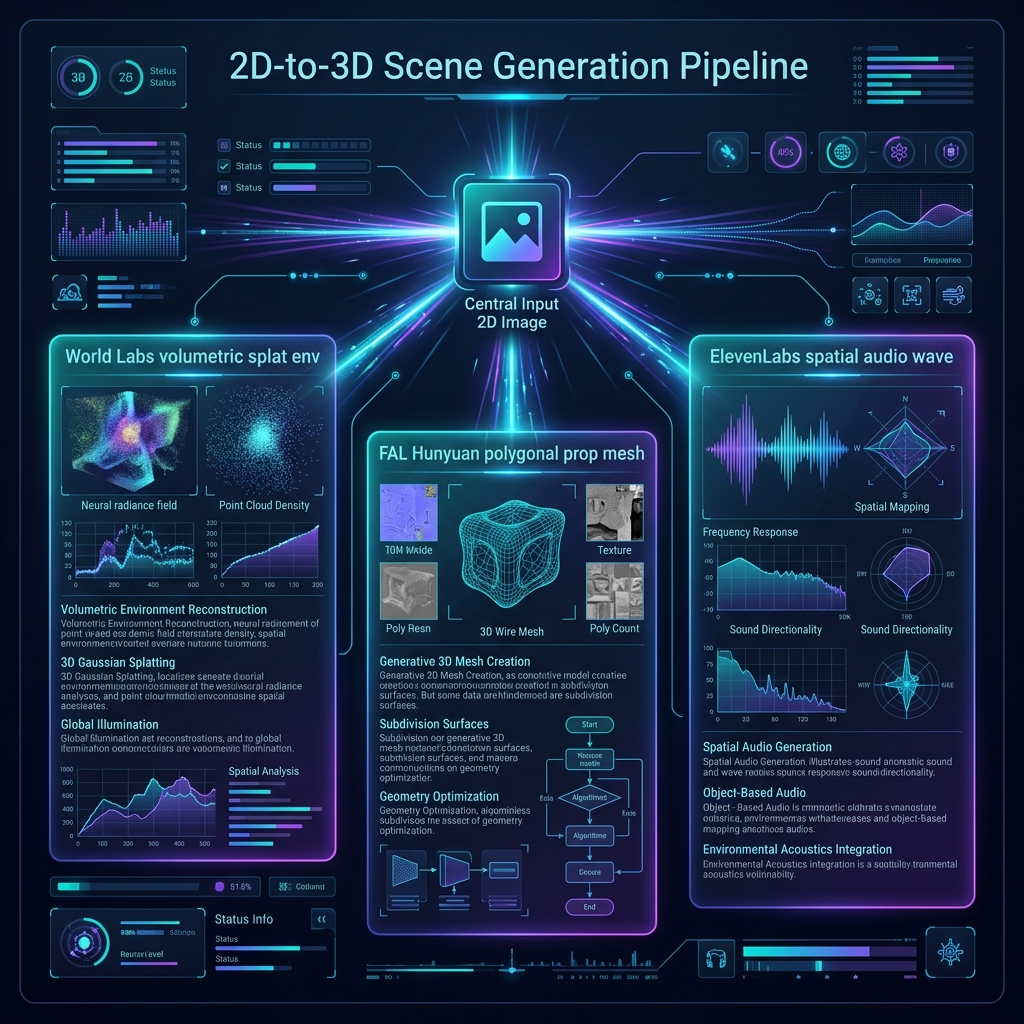
The Structural Data Flow
graph TD
    A[Input 2D Reference Image] --> B[Claude Code vision & local shell]
    B -->|Crop & segment props| C[FAL AI Hunyuan 3D-2 / Meshy API]
    B -->|Analyze depth & architecture| D[World Labs Spatial API]
    B -->|Visual context description| E[ElevenLabs Sound API]

    C -->|Generate textured props| F[Prop Meshes: .glb / .obj]
    D -->|Generate navigable environment| G[Volumetric World: .spz Splat]
    E -->|Generate spatial soundscape| H[Audio Files: .mp3 / .wav]

    F & G & H --> I[Completed walk-through scene directory]
Chaining the 4-Stage API Workflow
- Vision-Based Segmenting: Claude's vision engine analyzes the input image inside the
/inputfolder. It identifies high-value foreground props (like a chest, character, or weapon) and writes a quick Python script. This script crops and isolates these objects against transparent backgrounds so they're ready for 3D modeling. - Foreground Mesh Synthesis via FAL: These cropped images are dispatched to high-performance model endpoints hosted on FAL. By default, Image Blaster leverages Tencent's Hunyuan 3D-2 or Meshy to build textured 3D models from a single 2D view. You'll get standard GLB or OBJ assets in seconds.
- Volumetric Worlds via World Labs: Simultaneously, the raw image goes to the World Labs API. The World Labs engine estimates depths, computes camera angles, and outputs a volumetric 3D representation of the environment. This is saved as a Gaussian Splat (
.spzfile). - Context-Aware Audio via ElevenLabs: Claude Code compiles a list of atmospheric properties from your image (like "heavy rain on metal" or "creaking wooden door"). It sends these prompts to the ElevenLabs API to synthesize high-fidelity ambient soundscapes. You'll get physics-ready audio files that match the visual vibe.
3. Step-by-Step CLI Setup: A Developer's Quick-Start
If you're comfortable in the terminal, setting up the local Image Blaster script is a great weekend project. Let's walk through the exact steps to get this modular pipeline running on your local machine.
Prerequisites & Dependencies
First, ensure you've installed Node.js (v18 or higher) and a package manager like pnpm or npm. You'll also need a terminal developer tool like Claude Code to orchestrate the pipeline files.
1. Clone the Repository
Clone the official repository and change into the project folder:
git clone https://github.com/neilsonnn/image-blaster.git
cd image-blaster
2. Install Project Packages
Install the required dependency packages using your package manager:
pnpm install
# or if you use npm:
# npm install
This installs the core Node.js helper scripts, file parsers, and API clients needed to communicate with FAL, World Labs, and ElevenLabs.
3. Configure Your Environment Keys
Create a .env file in the root of the project directory to store your API access credentials:
touch .envOpen .env in your favorite editor (like VS Code or vim) and paste the following configuration lines:
FAL_KEY="your_fal_api_key_here"
WORLD_LABS_API_KEY="your_world_labs_api_key_here"
ELEVENLABS_API_KEY="your_elevenlabs_api_key_here"
Ensure there are no leading or trailing spaces around your keys. If you don't have all these keys yet, don't worry. The script will run gracefully, skipping the optional steps as detailed in our API Keys setup guide.
4. Run the Pipeline Command
Place your 2D reference image inside the ./input folder. For this example, let's assume it's named futuristic_crab.png. Execute the entry script via the command line:
node index.js --input ./input/futuristic_crab.png --output ./output/crab_scene --density highLet's break down the primary CLI arguments you can pass:
--input: Specifies the path to your source 2D reference image.--output: The target directory where your completed assets and splat files are compiled.--density: Controls the polygon density of the synthesized prop meshes (options:low,medium,high).--audio-format: Selects the sound effect output format (options:mp3,wav).
Understanding the Volumetric SPZ Output
Once the command finishes executing, you'll find an explorable folder under your specified output directory. The most impressive file is environment.spz.
An .spz file is a highly compressed, binary Gaussian Splat format developed to represent volumetric 3D spaces efficiently. Instead of defining surfaces with polygons, it stores millions of tiny 3D gaussians, each carrying spatial coordinates, scaling, opacity, and color parameters.
When you load this file into a compatible splat visualizer (like the web viewer or engine plugins), it rasterizes these points in real-time. This produces photorealistic lighting, reflections, and depth that traditional low-poly meshes simply can't reproduce.
4. High-Quality Video Integration: Experience the Workflow
To truly understand how this terminal orchestration runs in real-time, you must see it in action. The command-line interface communicates with the external APIs, tracks processing queues, and constructs the files directly on your local drive.
[!IMPORTANT] Must-Watch Independent Video Walkthrough
If you want to see a step-by-step demonstration of the installation, environment variable configurations, and a live walk-through of the resulting navigable
.spzspace, check out this excellent visual guide:
- Video Tutorial: One Photo, 5 Minutes, a Walkable 3D World — The New Claude Skill That Chains 4 AI Models
- What is covered:
- Cloned repository directory structures and terminal commands.
- Setting up developer API keys for FAL, World Labs, and ElevenLabs.
- Feeding a raw JPEG into the pipeline and analyzing the resulting mesh wireframes in real-time.
5. Key Advantages: Composable AI vs. Monolithic Tools
Historically, 3D generation tools operated in silos. You'd go to one website to turn an image into a GLB prop, another to generate an environment map, and a third to fetch royalty-free audio. It was a disjointed, frustrating loop.
Image Blaster represents a major shift toward modular orchestration:
- Unprecedented Pipeline Composability: Because it's open-source, you aren't locked into a single model. If a superior mesh generator launches on FAL, you can swap out Hunyuan 3D-2 by updating a single API string.
- Cohesive Scene Context: Claude Code ensures that your generated sound effects, background environments, and foreground props share the exact same aesthetic vibe.
- Extensible Local Automation: You can write quick shell scripts to batch-process folders of concept art, generating whole libraries of interactive scenes overnight.
6. What Files and Formats Are Produced?
A successful execution of Image Blaster compiles a complete asset directory. Here is an exhaustive breakdown of the generated files and how they translate into downstream game engines like Unity, Unreal Engine 5, and Blender:
| Asset Layer | Primary File Format | Generating Engine | Pipeline Purpose | Downstream Game Engine Compatibility |
|---|---|---|---|---|
| 3D Environment | .spz (Gaussian Splat) | World Labs | Provides the walkable volumetric spatial context and scene lighting. | Can be rendered in web tools or imported into Unity/UE5 using volumetric splat viewer plugins. |
| Object Props | .glb / .obj (Textured Polygons) | FAL AI (Hunyuan 3D-2 / Meshy) | Solid, interactive props and characters that can be moved, destroyed, or animated. | Native, standard drag-and-drop compatibility in Unity, Unreal Engine, Godot, Maya, and Blender. |
| Atmospheric SFX | .mp3 / .wav | ElevenLabs | Provides physics-based impact sounds and ambient spatial soundscapes. | Compatible with native audio source nodes, spatial sound mixers, and collision audio triggers. |
| Texture Cuts | .png / .jpeg | Claude vision crops | Extracted source textures and cropped foreground images for reference edits. | Used directly as materials, alpha decals, or billboard textures inside game engines. |
7. The "Last-Mile Gap": Honest Limitations of Raw AI Output
While the visual speed of Image Blaster is stunning, a professional game developer or 3D print creator must look past the initial "wow factor." You've got to evaluate the structural integrity of the output before putting it in your build.
This is what we call the "Last-Mile Gap" in AI 3D production:
[!WARNING] The Realities of Raw Generative Geometry
- Chaotic Topology: High-performance models like Hunyuan 3D-2 prioritize speed over structure. As a result, your exported GLB/OBJ files are often composed of a dense, chaotic triangle soup. They aren't clean, organized quad meshes.
- Non-Manifold Edges & Holes: The meshes frequently contain open boundaries and self-intersecting faces. If you import these raw models into Cura or PrusaSlicer, the slicer will fail or cause print collapses. If you assign standard colliders to them in Unity, they'll cause severe collision glitching.
- High API Credit Consumption: Running World Labs spatial splats, multi-subject crops on FAL, and ElevenLabs audio simultaneously consumes developer credits very quickly. A single failed run due to rate limits or bad segmentation still costs you money. Don't leave scripts running unchecked!
💡 Mini-Story: Sarah’s 3D Printing Disaster
Sarah, a hobbyist toy designer in Seattle, wanted to turn her daughter's hand-drawn concept of a "Galaxy Turtle" into a physical 3D print. She ran the sketch through a basic CLI image-to-3D script. The resulting model looked beautiful on screen, but that visual polish hid a structural mess.
When she loaded the exported STL file into her PrusaSlicer, the software flashed a red warning: "1,248 non-manifold edges detected." She tried to print it anyway, but the printer interpreted the interior holes as empty space. The turtle's shell collapsed into a messy tangle of plastic filament after two hours of printing. Sarah had to spend four hours manually stitching vertices in Blender just to fix the model. It's a classic example of why visual appearance isn't the same as print-ready topology.
8. Marble 3D AI: The Zero-Friction, Game-Ready Alternative
If you love terminal debugging, scripting, and have active developer API accounts, Image Blaster is an exceptional sandbox. It's perfect for prototyping and experimenting.
However, if your primary goal is to acquire clean-topology, physics-ready props without setting up local tools or paying multiple monthly API bills, Marble 3D AI is designed specifically for you. We've streamlined the entire pipeline.
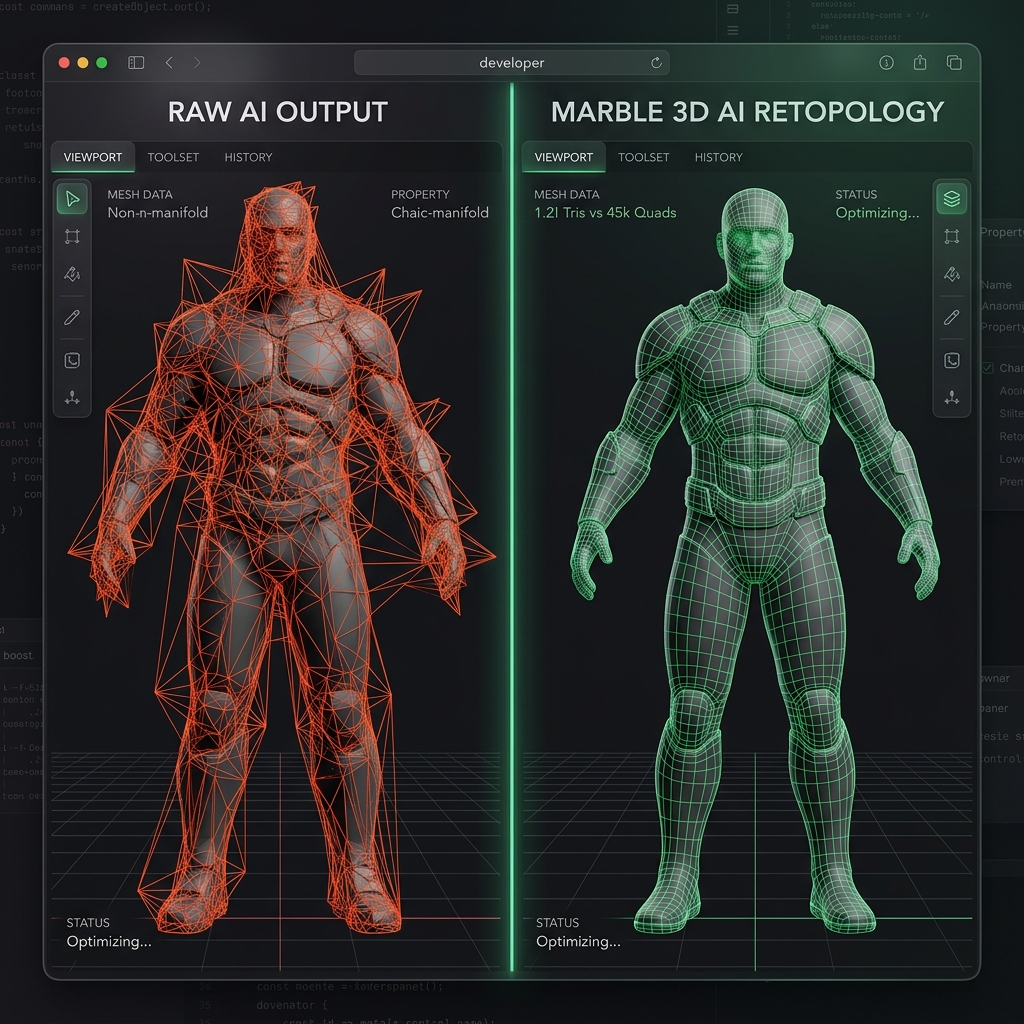
Why Choose Marble 3D AI?
- Dual-Engine Synthesis: Choose between the Trellis and Hunyuan 3D engines inside a unified workspace. Choose the engine that's optimized for your specific mesh style—Trellis for intricate organic models, or Hunyuan 3D for clean geometric shapes.
- Automated Retopology and Decimation: We've built an interactive decimation engine right into the viewport. You can scale down high-poly meshes in seconds to match your polygon budget, converting messy triangles into clean, game-ready base meshes.
- Guaranteed Watertight Geometry: Our platform automatically stitches open vertices and closes gaps. This ensures every exported STL or OBJ is direct-slicer ready for 3D printing or physics calculations in Unity and Unreal. You won't have to deal with collision glitches or failed prints.
- Interactive Browser Preview: Spin, zoom, toggle wireframe views, and inspect shading normals in our WebGL viewport before you spend download credits. You see exactly what you're getting.
- No API Key Administration: Drag-and-drop your image directly in the browser. We handle all backend integrations and compute allocations, saving you from complex billing setups and runaway credit costs.
Conclusion: How to Take Action
The generative AI 3D frontier is moving rapidly. Tools like Image Blaster represent the incredible power of composable automation. It's a fantastic playground for command-line developers who want to push the boundaries of spatial scene generation.
But if you want to bypass terminal configuration and instantly generate optimized, slicer-ready, and physics-compliant 3D props from 2D reference images:
- Pillar Tool URL: Visit the Marble 3D AI Interactive Workspace and upload your first reference image for free. It's that simple.
- Pricing Plans: Explore our affordable monthly subscription options on the Marble 3D AI Pricing Page to unlock high-resolution multi-format exports.
- Further Reading:
Frequently Asked Questions (FAQ)
Is Image Blaster an official, supported product?
No. Image Blaster is an open-source, independent developer project created by Nicholas Neilson. It's not an officially supported World Labs, Anthropic, or ElevenLabs commercial SaaS product.
What is the difference between a volumetric splat (.spz) and a standard mesh (.glb)?
A Gaussian Splat (.spz) is a point-cloud representation that captures light, reflections, and volumes, making it perfect for photorealistic environment walk-throughs. A standard mesh (.glb / .obj / .stl) consists of vertices, edges, faces, and UV textures, which are necessary for props and characters that need rigging, skeletal animations, and physical collisions.
Can I run Image Blaster completely for free?
No. While the codebase on GitHub is free to clone, running the pipeline calls paid APIs. You must purchase credit lines with FAL, World Labs, and ElevenLabs to execute the scripts. There's no free tier for API consumption.
Disclaimer: This article is an independent guide created by Marble 3D AI. It is not affiliated with, endorsed by, or officially connected to the Image Blaster GitHub project or its maintainers. All product names, project names, and trademarks belong to their respective owners.