Ghost Collision Ultimate Guide: Why Unity & Unreal Hit Invisible Walls and How to Fix It
Introduction: When the Floor Looks Flat but Plays Broken
You press Play. The corridor looks clean. The floor mesh is aligned. The animation is fine. Yet when your character runs forward, it suddenly stutters, bounces, or gets blocked by what feels like an invisible obstacle.
No visible rock. No wall. No prop.
Just a tiny hitch that ruins the experience.
This is one of the most frustrating physics bugs in game development: Ghost Collision.
Ghost collision happens when the player or an object collides with geometry that is technically present in the physics system, but visually unclear, misaligned, fragmented, or unexpectedly shaped. In practice, it feels like the engine invented an invisible wall.
This problem appears in both Unity and Unreal Engine, especially when teams import:
- AI-generated 3D assets
- kitbashed environment pieces
- auto-convex colliders
- modular floors and walls
- rushed marketplace assets
- models with poor topology or inconsistent scale
The bad news: ghost collision is rarely solved by a single checkbox.
The good news: once you understand where it comes from, you can prevent most cases systematically.
In this guide, we’ll cover:
- what ghost collision really is
- why it happens in Unity and Unreal
- the most common production scenarios
- traditional fixes and their limits
- how physics-ready 3D assets reduce the problem at the source
Part 1: What Is Ghost Collision?
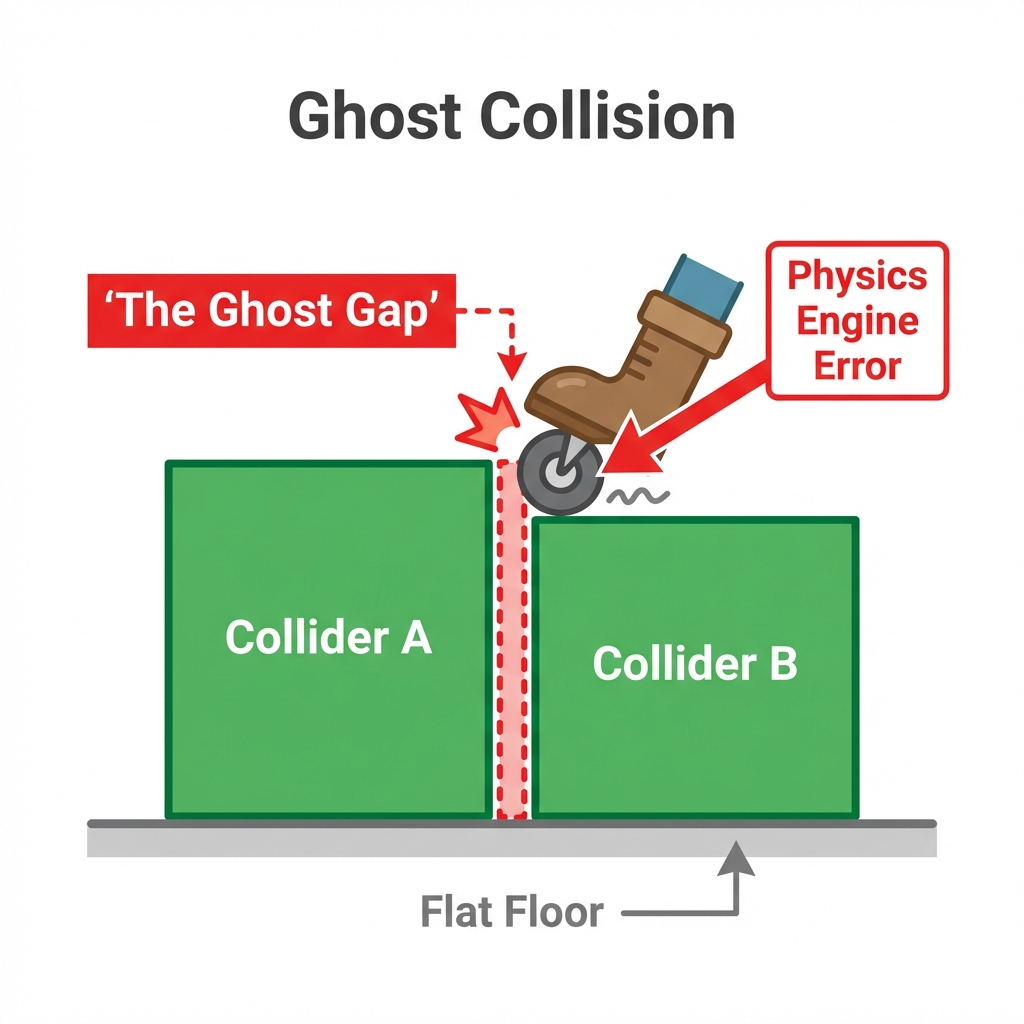
Ghost collision is the mismatch between what players see and what the physics engine detects.
Visually, the surface may look smooth and traversable.
Physically, the engine may be reading:
- overlapping convex hulls
- tiny collider seams
- protruding triangles
- duplicate hidden meshes
- badly decomposed collision volumes
- non-manifold or self-intersecting geometry
A Simple Mental Model
Think of it this way:
- The render mesh is what humans see.
- The collision mesh / collider is what the engine feels.
If those two disagree, the player notices immediately.
That disagreement produces symptoms like:
- the character catches on a flat floor seam
- wheels or projectiles bounce on empty space
- a physics object jitters while sliding across a surface
- an item appears grounded but is actually floating on hidden collision
- traversal feels “sticky” in one exact spot with no visible cause
Why It Feels Worse Than Normal Collision Bugs
A regular collision bug is visible: a wall blocks you because it is obviously there.
Ghost collision is worse because it breaks trust. The player sees one reality, but the engine enforces another.
That makes debugging slower and QA more expensive.
Part 2: Why Ghost Collision Happens
Ghost collision is not one bug. It is a family of failure modes.
1. Seams Between Multiple Colliders
This is the classic case.
A floor looks like one continuous plane, but under the hood it is built from many adjacent colliders. At the boundaries, slight gaps, overlaps, or normal inconsistencies can cause a character controller, rigidbody, or wheeled object to snag.
Common sources:
- modular level kits
- tiled terrain chunks
- separate imported environment pieces
- convex decomposition that creates many neighboring hulls
2. Auto-Generated Colliders That Overfit or Underfit
Auto-generated collision is fast, but not always stable.
If the collider is too detailed, it can preserve tiny bumps and spikes that players cannot see.
If it is too simplified, it may extend outside the visible mesh.
Both are bad:
- too detailed = jitter, snagging, noisy traversal
- too simple = invisible blocking, floating, inaccurate contact
3. Hidden or Duplicate Geometry
Imported assets often include extra meshes that artists never intended to collide with gameplay:
- hidden support meshes
- duplicated shells
- leftover export artifacts
- collision nodes copied accidentally
- nested transforms with stale geometry
The level looks correct, but the physics scene contains additional blocking surfaces.
4. Bad Topology and Self-Intersection
If the underlying geometry is structurally messy, collision generation becomes unreliable.
Typical problems include:
- non-manifold edges
- flipped normals
- self-intersections
- disconnected floating islands
- extremely thin triangles
- inconsistent scale or pivot placement
When collision is built on top of unstable geometry, ghost collision becomes much more likely.
5. Transform, Scale, and Pivot Errors
Sometimes the mesh is fine, but transforms are not.
A model imported with unusual scale, offset pivot, or nested transform compensation can produce colliders that are technically correct in local space but wrong in gameplay space.
This is especially common when assets move through multiple tools before reaching the engine.
Part 3: Common Ghost Collision Scenarios in Production
Scenario A: Character Sticks on a Hallway Floor Seam
A modular sci-fi corridor is assembled from repeated floor panels. The art looks perfectly aligned, but every few meters the character controller catches for a frame.
Likely cause:
- neighboring box colliders are slightly misaligned
- imported mesh colliders have edge noise
- character capsule is contacting seam transitions
Scenario B: Vehicle or Rolling Object “Bumps” on Smooth Ground
A ball, crate, or wheel hops on what appears to be a flat surface.
Likely cause:
- collision surface contains tiny triangle protrusions
- convex hull boundaries create uneven transitions
- contact offset or collision complexity amplifies micro-errors
Scenario C: Player Cannot Pass a Door Frame Cleanly
The door opening looks wide enough, but players get caught on one side when entering at speed.
Likely cause:
- collider extends beyond the visible trim
- imported frame contains multiple overlapping hulls
- one hidden child mesh still has collision enabled
Scenario D: VR Hand Interaction Fails on Decorative Props
In VR, the hand appears to touch empty space before reaching the model, or partially passes through one side while blocking on the other.
Likely cause:
- hand interaction depends on simplified but badly placed colliders
- asymmetrical decomposition creates unexpected physical volume
- model geometry is visually rich but physically incoherent
Scenario E: AI-Generated Asset Looks Great but Plays Wrong
This is becoming more common.
AI-generated 3D assets can look visually impressive while still lacking clean structure for production use. If collision is generated from unstable geometry, the result may look acceptable in screenshots but fail during traversal, combat, driving, or VR interaction.
Part 4: Unity vs Unreal — Same Pain, Different Surfaces
Both engines suffer from ghost collision, but the workflow details differ.
Unity
In Unity, ghost collision often shows up around:
- Mesh Collider usage on imported environment assets
- composite scenes built from many objects
- CharacterController movement over seams
- Convex vs non-convex tradeoffs
- layer filtering that hides the real source of contact
Typical Unity debugging checks:
- inspect every collider in Scene view
- compare render mesh vs collider bounds
- simplify or replace Mesh Colliders on traversal surfaces
- merge or redesign modular floor collision
- verify import scale and pivot alignment
Unity documentation consistently emphasizes choosing the simplest collider shape practical for performance and stability, especially for gameplay-critical surfaces.
Unreal Engine
In Unreal, ghost collision commonly appears with:
- auto-generated simple collision on imported static meshes
- overly aggressive convex decomposition
- “Use Complex as Simple” misuse
- mismatched collision presets or channels
- modular environment seams and hidden blocking volumes
Typical Unreal debugging checks:
- open Static Mesh Editor and visualize simple collision
- inspect collision complexity settings
- reduce excessive hull count
- remove hidden geometry from collision generation
- verify scale, pivots, and import transforms
Epic’s docs and community best practices repeatedly point to the same principle: collision should be intentional, simplified, and tested in motion, not assumed from visual appearance.
Part 5: Traditional Fixes and Why They’re Expensive
When ghost collision appears, teams usually try the following.
Fix 1: Manually Edit Colliders
Pros:
- precise when done well
- reliable for hero assets
Cons:
- slow
- hard to scale across large libraries
- easy to regress after re-imports
Fix 2: Replace Mesh Colliders with Primitive Colliders
Pros:
- more stable
- faster runtime performance
Cons:
- poor fit for irregular geometry
- can introduce invisible blocking if oversimplified
Fix 3: Tune Engine Physics Settings
Examples include contact offsets, collision detection modes, step offsets, and movement parameters.
Pros:
- can reduce symptoms in edge cases
Cons:
- often masks the root cause instead of fixing it
- may improve one asset while breaking another
Fix 4: Rebuild the Source Mesh
Pros:
- solves structural issues at the origin
Cons:
- expensive
- requires 3D expertise
- breaks the speed promise of AI-assisted workflows
Fix 5: Write Special-Case Gameplay Logic
Teams sometimes add custom smoothing, ignore volumes, or movement correction code.
Pros:
- useful for a critical blocker
Cons:
- brittle
- accumulates technical debt
- treats symptoms, not geometry quality
The Core Problem
Most traditional fixes happen too late.
By the time ghost collision is discovered, the asset is already imported, placed, tested, and sometimes shipped into a build branch. That means every fix costs more than it should.
If ghost collision keeps reappearing late in production, check Marble 3D AI pricing and move more collision quality upstream instead of paying for fixes downstream.
Part 6: The Better Approach — Prevent Ghost Collision Upstream
The most efficient solution is to reduce collision risk before the asset reaches level assembly.
That means using assets that are not just visually acceptable, but structurally and physically usable.
What Physics-Ready Actually Means
A physics-ready 3D asset should include or support:
- clean structural geometry
- predictable collider generation
- minimized seam risk
- stable pivot and scale behavior
- collision shapes suited to real engine use
- compatibility with Unity and Unreal workflows
This is where many visual-first AI tools still fall short.
They may generate something that looks impressive in a thumbnail, but production teams still inherit the burden of collider cleanup, topology inspection, and repeated import testing.
How Marble 3D AI Helps
Marble 3D AI is built around the idea that game-ready assets must be more than pretty meshes.
Its workflow is designed to push assets toward Physics-Ready output, including:
- optimized collider generation
- center-of-mass awareness
- structural consistency checks
- topology-conscious validation
- quality scoring before downstream use
For ghost collision specifically, that matters because better structural consistency means fewer opportunities for:
- stray protrusions
- fragmented physical surfaces
- unstable decomposition
- collision seams caused by bad geometry
It does not remove the need for engine-side testing on every possible gameplay setup, but it significantly reduces the amount of manual cleanup required before that stage.
Part 7: Practical Best Practices for Teams
If you want fewer invisible-wall bugs, use this checklist.
On Traversal Surfaces
- prefer simple, intentional colliders over raw mesh collision
- avoid unnecessary seams on floors, ramps, and door thresholds
- test movement diagonally, not just straight ahead
- validate with both slow and fast movement
On Imported Assets
- inspect collision separately from visuals
- remove hidden or duplicate meshes before import
- normalize scale and pivot placement
- avoid relying blindly on automatic convex decomposition
On AI-Generated 3D Assets
- verify topology before generating gameplay collision
- check whether the asset is structurally coherent, not just attractive
- test in the target engine early
- prioritize assets that are created for physics-ready export workflows
On QA
- keep a dedicated ghost-collision test scene
- run rolling-object and capsule-traversal tests
- test VR/interaction contact separately from character movement
- log exact hit locations and asset names for recurring hotspots
Conclusion: Invisible Walls Are Usually Pipeline Problems
Ghost collision feels like a weird engine bug, but in most cases it is a pipeline quality issue.
The engine is not being haunted. It is reacting to bad, fragmented, overcomplicated, or misleading collision data.
That is why the best long-term fix is not endless manual patching. It is a better asset pipeline.
In this guide, we covered:
- what ghost collision is and why it feels so frustrating
- the major causes in Unity and Unreal
- the most common production scenarios
- why traditional fixes are slow and hard to scale
- how physics-ready assets reduce collision bugs earlier in the workflow
If your team is building game, VR, or simulation content with AI-generated 3D assets, collision quality cannot be treated as an afterthought.
A beautiful mesh that creates invisible walls is not production-ready.
Marble 3D AI helps teams move closer to assets that are visually strong and physically usable from the start.
If you want fewer invisible blockers, fewer seam bugs, and less manual collider cleanup, start with assets designed for real engine behavior—not just screenshots.
See Marble 3D AI pricing to pick the right workflow for your team and generate physics-ready 3D assets built for actual gameplay.
Physics-Ready 3D Topic Matrix
This article is one part of a six-post cluster around the same production problem: why AI-generated 3D assets look finished earlier than they become physically usable. If you want the full picture, move through the links below based on the bottleneck you are solving:
- From Visual Stunning to Physics-Ready: The Last Mile of AI 3D — Start here if you want the big-picture definition of why beautiful AI meshes still fail in production.
- How Marble's Spatial Consistency Engine Makes 3D Assets Physics-Ready — Read this next if you want the technical mechanism behind structure checks, collider generation, and verification.
- Unity Nightmare: Why AI 3D Models Clip and How to Fix It — Use this when your immediate problem is Unity clipping, pass-through collisions, or broken collider behavior.
- The Invisible Time Killer for Indie Devs: Why 3D Asset Cleanup Eats 70% of Production Time — Use this to frame the business cost: cleanup work stealing sprint time, margin, and shipping speed.
- 12-Minute Retopology? How Automation Tools Save Your 3D Workflow — Read this when topology cleanup and manual retopology are the real bottleneck behind the delay.
References:
- Unity Manual — Colliders Overview: https://docs.unity3d.com/Manual/CollidersOverview.html
- Unity Manual — Mesh Collider component: https://docs.unity3d.com/Manual/class-MeshCollider.html
- Unreal Engine Documentation — Setting Up Collisions With Static Meshes: https://dev.epicgames.com/documentation/en-us/unreal-engine/setting-up-collisions-with-static-meshes-in-unreal-engine
- Unreal Engine Documentation — Simple versus Complex Collision: https://dev.epicgames.com/documentation/en-us/unreal-engine/simple-versus-complex-collision-in-unreal-engine
Author: Marble 3D AI Team
Published: April 9, 2026